Outdated この素晴らしい世界に祝福を!ファンタスティックデイズ(このファン) v1.3.1 MOD [UPDATE]

Status
Not open for further replies.

DHAalpha

Approved Poster
51,588
01/03/19
13,399
Thread Author
302ded93ab966cdbd8903753cfc718fd.png


Name: この素晴らしい世界に祝福を!ファンタスティックデイズ(このファン)
Version: 1.3.1
Root: No

Mod features:
1. MOD MENU
2. Attack Multiplier (x1 ~ x100)
3. Defense Multiplier (x1 ~ x100)
4. Unlimited Skills
IF YOU'RE OUTSIDE JAPAN THE GAME WILL NEED JAPAN VPN AND JAPAN TIMEZONE SET IN YOUR DEVICE TO LOGIN

Install Steps:
Download
Install

Credits: ?
Playstore Link: この素晴らしい世界に祝福を!ファンタスティックデイズ(このファン) - Apps on Google Play

Download Mod Apk: MOD APK
Download Obb: OBB
MirrorA
MirrorO
 
Last edited:
Mod not working

It works. A number was assigned to text file. If you don't, you won't hear. In the blank 100 100 ON Try to substitute I work this way. It seems that the skill will not accumulate unless you attack once.
 
てて電話のチェックがないんですが?
電話はなくても効きますので大丈夫です。ストレージだけチェックすれば起動できます。
起動後に/sdcard/ location a "PLATINMODS.COM ファイル内のテキストに100 100 ONと入れればMODが使用できます。
スキルは1回攻撃すればと貯るみたいです。
 
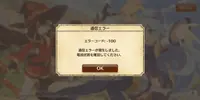
有使用VPN,還是出這信息?
 

Attachments

  • Screenshot_2020-03-04-17-13-06.webp
    Screenshot_2020-03-04-17-13-06.webp
    53.2 KB · Views: 77
I con not find this → platinmods_GAMENAME.txt file
it was mentioned on the spoiler posted by the OP..read it thoroughly
0. Android 6+ it is necessary to enable the storage & phone permissions in the app settings first (or game crashs).
1. The cheats are by default always all active and set to max multiplier.
2. On first start the game will create in your /sdcard/ location a "PLATINMODS.COM" folder with the platinmods_GAMENAME.txt inside.
3. Open that file with any editor and change the values to what you like.
4. Save the file to apply the changes.

NOTE: TO READ/EDIT THE FILE IS RECOMMENDED THE USE OF X-PLORE: X-plore File Manager - Apps on Google Play
 
it was mentioned on the spoiler posted by the OP..read it thoroughly
0. Android 6+ it is necessary to enable the storage & phone permissions in the app settings first (or game crashs).
1. The cheats are by default always all active and set to max multiplier.
2. On first start the game will create in your /sdcard/ location a "PLATINMODS.COM" folder with the platinmods_GAMENAME.txt inside.
3. Open that file with any editor and change the values to what you like.
4. Save the file to apply the changes.

NOTE: TO READ/EDIT THE FILE IS RECOMMENDED THE USE OF X-PLORE: X-plore File Manager - Apps on Google Play
but my phone do not have sdcard so I can not find it
 
Status
Not open for further replies.
Back
Top Bottom