dasmOs26
New User
Same here.... I was give up because I try and try 4 hrs and nothing.. Even I go check on YouTube and see how must do and nothing happen..
I think it is a bug with the mod. Hopefully it get fixed.


Same here.... I was give up because I try and try 4 hrs and nothing.. Even I go check on YouTube and see how must do and nothing happen..


No,i install in cellphone.
my device is HTC U12, Andria 8.0
What's matter with you?

Hi,
Ist there a way to save the Game in Google or Facebook??
Thanks in advance.
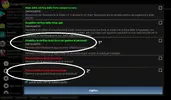
Need to use Lucky Patcher, but I can explain how only with an italian screenshot 'cause I don't know same options in english version.
First of all install normal version of game and register it with your FB or Google account and then exit.
Now use Lucky Patcher, select game and go on tools --> patch android --> select option 1°, apply and wait it done.
After this you can install apk mod (overwriting the normal apk installed).
Return to Lucky Patcher, select game and go on tools --> patch android --> select option 2°, apply and wait it done.
OK.... now you can play game with your account registered.
@wvereeck