Jacknator

Do not PM me abt game update, ill ignore.
Exclusive Modding Team
17,010
10/05/15
378,179
Thread Author
Malaysia
da3bfb06d3713cfc2ea08d1b7806a51d.png

Name: Avatar Generations
Version: 1.14.397054
Root: Yes with Magisk + Zygisk
Architecture: ARM64

Mod features:
1. Damage x1-100
2. Defense x1-100
3. Enemy no turn
4. Unlimited skill
5. 1 wave win

Install Steps:
1. Make sure you have original game from Playstore
2. Download and install module
3. Reboot device
4. Enjoy!

Why mod doesnt work/crash ?
Most likely the game is update and not matching game and module version

Alternative people that doesnt have root device, can use any virtual machine (VM) which support magisk/zygisk

Credits: Jacknator
Telegram: Update news
Playstore Link: Avatar Generations - Apps on Google Play
To see this hidden content, you must reply or react with one of the following reactions : Like Like, Love Love, Haha Haha, Wow Wow
 
Last edited:
[Attachment removed from Quotes]
Name: Avatar Generations
Version: 1.07.371416
Root: No
Architecture: ARM64

Mod features:
1. Unlimited damage
2. Unlimited defense
3. Enemy no turn
4. Unlimited skill
5. 1 wave win

Install Steps:
1. Download & Install mod
2. Enable "DRAW OVER" or "DISPLAY POP-UP WINDOW" permission (if Android 6+)
3. Enable storage permission
4. Enjoy!

HOW TO ENABLE PERMISSION ON ANDROID
  • Open device "Settings"
  • Go to APPS
  • Scroll down to desired APP and TAP IT
  • Go to "OTHER PERMISSIONS" or "ADVANCED PERMS" and tick "DRAW OVER" or "DISPLAY POP-UP WINDOW"
WHY BLACK/WHITE SCREEN/CRASHED ?
  • Enable STORAGE permission
  • Mod does not support VM
  • Remove gameguardian or any similar memory tool
  • Remove adblocker
  • Some device has battery optimization, disable it
GAME STILL CRASHED, HOW TO SEND LOGS ?
  • Go to folder /Android/data/game package name/files/mod_menu_crash_logs.txt
  • Copy & paste or take a screenshot inside the logs, send it here
  • Some device may have different dir (document files)
  • Alternative way: Install matlogs app (required root device), open matlogs & click start record. Open the game wait for game crashed or few minutes and stop record.
Think of it as a way to support me, I'm doing my best to keep them user friendly and not frequent. There is always one on start and after that one every 30mins! Think of it as a small contribution and not a pain in the ass.
VIP users will not see ads!

Credits: Jacknator
Telegram: Update news
Playstore Link: Avatar Generations - Apps on Google Play
[Hidden content]


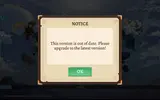
Update please thank you
 
Just downloaded as I thought this was updated. Please update
 

Attachments

  • Screenshot_20230422_151526_Avatar.webp
    Screenshot_20230422_151526_Avatar.webp
    41 KB · Views: 40
[Attachment removed from Quotes]
Name: Avatar Generations
Version: 1.07.371416
Root: No
Architecture: ARM64

Mod features:
1. Unlimited damage
2. Unlimited defense
3. Enemy no turn
4. Unlimited skill
5. 1 wave win

Install Steps:
1. Download & Install mod
2. Enable "DRAW OVER" or "DISPLAY POP-UP WINDOW" permission (if Android 6+)
3. Enable storage permission
4. Enjoy!

HOW TO ENABLE PERMISSION ON ANDROID
  • Open device "Settings"
  • Go to APPS
  • Scroll down to desired APP and TAP IT
  • Go to "OTHER PERMISSIONS" or "ADVANCED PERMS" and tick "DRAW OVER" or "DISPLAY POP-UP WINDOW"
WHY BLACK/WHITE SCREEN/CRASHED ?
  • Enable STORAGE permission
  • Mod does not support VM
  • Remove gameguardian or any similar memory tool
  • Remove adblocker
  • Some device has battery optimization, disable it
GAME STILL CRASHED, HOW TO SEND LOGS ?
  • Go to folder /Android/data/game package name/files/mod_menu_crash_logs.txt
  • Copy & paste or take a screenshot inside the logs, send it here
  • Some device may have different dir (document files)
  • Alternative way: Install matlogs app (required root device), open matlogs & click start record. Open the game wait for game crashed or few minutes and stop record.
Think of it as a way to support me, I'm doing my best to keep them user friendly and not frequent. There is always one on start and after that one every 30mins! Think of it as a small contribution and not a pain in the ass.
VIP users will not see ads!

Credits: Jacknator
Telegram: Update news
Playstore Link: Avatar Generations - Apps on Google Play
[Hidden content]


Update please & thank you
 
Kenapa menu mod nya tidak keluar saya install dengan benar di magisk, kemarin keluar menu mod tapi sekarang tidak, mohon di update lagi pak
Reboot device
 
I have restarted my device sir, and I have also tried how to remove and reinstall the module, I have also tried deleting the game data 5 times but still the mod menu doesn't appear, please help sir
Check your game version see if same as module version, other than that i have no idea lol
 
Check your game version see if same as module version, other than that i have no idea lol
The game version is the same as in the playstore sir and the module version is also the same as the game version in the playstore
 
Back
Top Bottom