Rempacious
Rooted Member
If that so, guess I'll migrate to JP.I only do update scripts during events.
No event = no update. play legit


If that so, guess I'll migrate to JP.I only do update scripts during events.
No event = no update. play legit


Hello, I'm currently learning how to use the autopatcher, I saw a previous comments of yours saying that the reason why this error occurs is because of missing files in unity asset files. May I know what kind of files are you talking about? Is it from the game itself or must we source outside?
someone let me know how to patch other country ??
i on KR server user
i already find azur lane autopatch
is this still working ??

I only update the script during eventsupdate pls


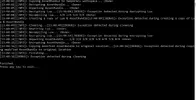
=== START =================================================================================
Exception detected during decrypting Lua
Date: 16/11/2561 17:45:23
Exception Message: Could not find a part of the path 'D:\Azur-Lane-Scripts-Autopatcher-2.8.2-f2\Azur-Lane-Scripts-Autopatcher\bin\Debug\temp\Unity_Assets_Files\scripts\CAB-android\aircraft_template.lua.txt'.
Exception StackTrace: at System.IO.__Error.WinIOError(Int32 errorCode, String maybeFullPath)
at System.IO.FileStream.Init(String path, FileMode mode, FileAccess access, Int32 rights, Boolean useRights, FileShare share, Int32 bufferSize, FileOptions options, SECURITY_ATTRIBUTES secAttrs, String msgPath, Boolean bFromProxy, Boolean useLongPath, Boolean checkHost)
at System.IO.FileStream..ctor(String path, FileMode mode, FileAccess access, FileShare share, Int32 bufferSize, FileOptions options, String msgPath, Boolean bFromProxy, Boolean useLongPath, Boolean checkHost)
at System.IO.File.InternalReadAllBytes(String path, Boolean checkHost)
at Azurlane.LuaMgr.CheckLuaState(String filePath) in D:\Azur-Lane-Scripts-Autopatcher-2.8.2-f2\Azur-Lane-Scripts-Autopatcher\LuaMgr.cs:line 21
at Azurlane.Program.<>c__DisplayClass5_0.<Main>b__3() in D:\Azur-Lane-Scripts-Autopatcher-2.8.2-f2\Azur-Lane-Scripts-Autopatcher\Program.cs:line 159
=== END ===================================================================================
=== START =================================================================================
Exception detected during creating a copy of Lua & AssetBundle
Date: 16/11/2561 17:45:23
Exception Message: Could not find a part of the path 'D:\Azur-Lane-Scripts-Autopatcher-2.8.2-f2\Azur-Lane-Scripts-Autopatcher\bin\Debug\temp\Unity_Assets_Files\scripts\CAB-android\aircraft_template.lua.txt'.
Exception StackTrace: at System.IO.__Error.WinIOError(Int32 errorCode, String maybeFullPath)
at System.IO.File.InternalCopy(String sourceFileName, String destFileName, Boolean overwrite, Boolean checkHost)
at Azurlane.Program.<>c__DisplayClass5_0.<Main>b__5() in D:\Azur-Lane-Scripts-Autopatcher-2.8.2-f2\Azur-Lane-Scripts-Autopatcher\Program.cs:line 202
=== END ===================================================================================
=== START =================================================================================
Exception detected during encrypting Lua
Date: 16/11/2561 17:45:25
Exception Message: Could not find file 'D:\Azur-Lane-Scripts-Autopatcher-2.8.2-f2\Azur-Lane-Scripts-Autopatcher\bin\Debug\temp\Unity_Assets_Files\scripts-godmode\CAB-android\aircraft_template.lua.txt'.
Exception StackTrace: at System.IO.__Error.WinIOError(Int32 errorCode, String maybeFullPath)
at System.IO.FileStream.Init(String path, FileMode mode, FileAccess access, Int32 rights, Boolean useRights, FileShare share, Int32 bufferSize, FileOptions options, SECURITY_ATTRIBUTES secAttrs, String msgPath, Boolean bFromProxy, Boolean useLongPath, Boolean checkHost)
at System.IO.FileStream..ctor(String path, FileMode mode, FileAccess access, FileShare share, Int32 bufferSize, FileOptions options, String msgPath, Boolean bFromProxy, Boolean useLongPath, Boolean checkHost)
at System.IO.File.InternalReadAllBytes(String path, Boolean checkHost)
at Azurlane.LuaMgr.CheckLuaState(String filePath) in D:\Azur-Lane-Scripts-Autopatcher-2.8.2-f2\Azur-Lane-Scripts-Autopatcher\LuaMgr.cs:line 21
at Azurlane.Program.<>c.<Main>b__5_9() in D:\Azur-Lane-Scripts-Autopatcher-2.8.2-f2\Azur-Lane-Scripts-Autopatcher\Program.cs:line 270
=== END ===================================================================================
=== START =================================================================================
Exception detected during copying modified AssetBundle to original location
Date: 16/11/2561 17:45:26
Exception Message: Could not find file 'D:\Azur-Lane-Scripts-Autopatcher-2.8.2-f2\Azur-Lane-Scripts-Autopatcher\bin\Debug\temp\scripts-godmode'.
Exception StackTrace: at System.IO.__Error.WinIOError(Int32 errorCode, String maybeFullPath)
at System.IO.File.InternalCopy(String sourceFileName, String destFileName, Boolean overwrite, Boolean checkHost)
at Azurlane.Program.<>c__DisplayClass5_0.<Main>b__12() in D:\Azur-Lane-Scripts-Autopatcher-2.8.2-f2\Azur-Lane-Scripts-Autopatcher\Program.cs:line 329
=== END ===================================================================================
hmm how to fix it
you can tell me bro

Hello, I'm currently learning how to use the autopatcher, I saw a previous comments of yours saying that the reason why this error occurs is because of missing files in unity asset files. May I know what kind of files are you talking about? Is it from the game itself or must we source outside?
i think i missing UnityEx right bro ?Are you sure you have all tools needed? You need 3rd party tools beside autopatcher..

The error when you missing UnityEx is different, not this onei think i missing UnityEx right bro ?
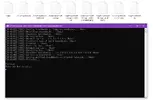
You are missing a folder called Unity_Assets_Files=== START =================================================================================
Exception detected during decrypting Lua
Date: 16/11/2561 17:45:23
Exception Message: Could not find a part of the path 'D:\Azur-Lane-Scripts-Autopatcher-2.8.2-f2\Azur-Lane-Scripts-Autopatcher\bin\Debug\temp\Unity_Assets_Files\scripts\CAB-android\aircraft_template.lua.txt'.
Exception StackTrace: at System.IO.__Error.WinIOError(Int32 errorCode, String maybeFullPath)
at System.IO.FileStream.Init(String path, FileMode mode, FileAccess access, Int32 rights, Boolean useRights, FileShare share, Int32 bufferSize, FileOptions options, SECURITY_ATTRIBUTES secAttrs, String msgPath, Boolean bFromProxy, Boolean useLongPath, Boolean checkHost)
at System.IO.FileStream..ctor(String path, FileMode mode, FileAccess access, FileShare share, Int32 bufferSize, FileOptions options, String msgPath, Boolean bFromProxy, Boolean useLongPath, Boolean checkHost)
at System.IO.File.InternalReadAllBytes(String path, Boolean checkHost)
at Azurlane.LuaMgr.CheckLuaState(String filePath) in D:\Azur-Lane-Scripts-Autopatcher-2.8.2-f2\Azur-Lane-Scripts-Autopatcher\LuaMgr.cs:line 21
at Azurlane.Program.<>c__DisplayClass5_0.<Main>b__3() in D:\Azur-Lane-Scripts-Autopatcher-2.8.2-f2\Azur-Lane-Scripts-Autopatcher\Program.cs:line 159
=== END ===================================================================================
=== START =================================================================================
Exception detected during creating a copy of Lua & AssetBundle
Date: 16/11/2561 17:45:23
Exception Message: Could not find a part of the path 'D:\Azur-Lane-Scripts-Autopatcher-2.8.2-f2\Azur-Lane-Scripts-Autopatcher\bin\Debug\temp\Unity_Assets_Files\scripts\CAB-android\aircraft_template.lua.txt'.
Exception StackTrace: at System.IO.__Error.WinIOError(Int32 errorCode, String maybeFullPath)
at System.IO.File.InternalCopy(String sourceFileName, String destFileName, Boolean overwrite, Boolean checkHost)
at Azurlane.Program.<>c__DisplayClass5_0.<Main>b__5() in D:\Azur-Lane-Scripts-Autopatcher-2.8.2-f2\Azur-Lane-Scripts-Autopatcher\Program.cs:line 202
=== END ===================================================================================
=== START =================================================================================
Exception detected during encrypting Lua
Date: 16/11/2561 17:45:25
Exception Message: Could not find file 'D:\Azur-Lane-Scripts-Autopatcher-2.8.2-f2\Azur-Lane-Scripts-Autopatcher\bin\Debug\temp\Unity_Assets_Files\scripts-godmode\CAB-android\aircraft_template.lua.txt'.
Exception StackTrace: at System.IO.__Error.WinIOError(Int32 errorCode, String maybeFullPath)
at System.IO.FileStream.Init(String path, FileMode mode, FileAccess access, Int32 rights, Boolean useRights, FileShare share, Int32 bufferSize, FileOptions options, SECURITY_ATTRIBUTES secAttrs, String msgPath, Boolean bFromProxy, Boolean useLongPath, Boolean checkHost)
at System.IO.FileStream..ctor(String path, FileMode mode, FileAccess access, FileShare share, Int32 bufferSize, FileOptions options, String msgPath, Boolean bFromProxy, Boolean useLongPath, Boolean checkHost)
at System.IO.File.InternalReadAllBytes(String path, Boolean checkHost)
at Azurlane.LuaMgr.CheckLuaState(String filePath) in D:\Azur-Lane-Scripts-Autopatcher-2.8.2-f2\Azur-Lane-Scripts-Autopatcher\LuaMgr.cs:line 21
at Azurlane.Program.<>c.<Main>b__5_9() in D:\Azur-Lane-Scripts-Autopatcher-2.8.2-f2\Azur-Lane-Scripts-Autopatcher\Program.cs:line 270
=== END ===================================================================================
=== START =================================================================================
Exception detected during copying modified AssetBundle to original location
Date: 16/11/2561 17:45:26
Exception Message: Could not find file 'D:\Azur-Lane-Scripts-Autopatcher-2.8.2-f2\Azur-Lane-Scripts-Autopatcher\bin\Debug\temp\scripts-godmode'.
Exception StackTrace: at System.IO.__Error.WinIOError(Int32 errorCode, String maybeFullPath)
at System.IO.File.InternalCopy(String sourceFileName, String destFileName, Boolean overwrite, Boolean checkHost)
at Azurlane.Program.<>c__DisplayClass5_0.<Main>b__12() in D:\Azur-Lane-Scripts-Autopatcher-2.8.2-f2\Azur-Lane-Scripts-Autopatcher\Program.cs:line 329
=== END ===================================================================================
hmm how to fix it
you can tell me bro
scripts files has been compiled but not working. hmmmmmm
1. Reinstall Python to the folder that can be easily add to PATHI have the same issue. The program generates the script files without throwing any error or exception
From checking other posts, I have seen that for some people the issue was on Python side, either not being installed or not in path variables, but that didnt fix it for me. I have also checked if I was missing any third party tool or any of the files (I have rewriter.exe as well) but from what I have seen nothing is missing.
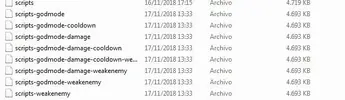
I have noticed that all the generated files have the same size (which doesnt seem to be the case if the file patching is done properly), which leads me to believe that the problem comes to when the scripts file is being modified.
Maybe someone could give us a hint on how to deal with this error, I have tried many things to no avail and Im completely lost on what else I could do.
keep trying. I believe your hardwork will be rewarded 
EN version is a secret. For now, you will never find one unless you learn to run the patcheris it working on EN ? where the updates. please update EN version. Thanks
He only update when there's an event. For now just play legitplease update the mod