


Jailbroken Black Clover M (All Version) +5 [Mods] with Auto Updater(beta) [MOD]
- Thread starter th0rn
- Start date
You are using an out of date browser. It may not display this or other websites correctly.
You should upgrade or use an alternative browser.
You should upgrade or use an alternative browser.

kalid18
New User
Je sais que les gens l'ont demandé mais je ne sais pas si je suis aveugle mais je ne vois pas le lien IPA pour le téléchargement, juste le mod et le framework deb. Je suis aussi VIP. Quelqu'un m'aide ?
when i come back from vacation, ive said this for sometime nowHi when SP will be fixed
Nightbirde
New User
kyojisei
New User
Idk that is out of my hands. Apple did some changes that breaks jit on ios 17when will i be able to enable jit on ios 17.1.1? (i do not own a mac)

kingdiggy
New User
[Update]
- Updated [Infinite SP]
Close and reopen app in order to get new cheat configuration
- Updated [Infinite SP]
Close and reopen app in order to get new cheat configuration
Post automatically merged:
On the mod menu there is a heart icon, press it and that is the donate button. Thank you very muchI want to donate you how can you help me in this

Yomo_kr
New User

johny34110
New User

Jahnsen
New User

ecdise1
New User
Nightbirde
New User
on what modes did u use hack?They just banned my account, GG.
Beware.

donttoutch
New User
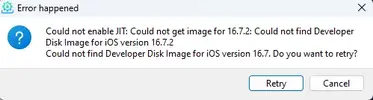
If you are not able to enable JIT then no.Doesn't it work in this version? iPhone 8

pepsiouy112
New User
I use ios 17.2.1 but it crash how to fix it I already add com.rizzmodz.rmz_0.1.4b_iphoneos-arm.deb and Black_Clover_M_v1.02.109_RootLess.deb[Attachment removed from Quotes]
Name: Black Clover M
Version: (All Version) +5 [Mods] with Auto Updater(beta)
Jailbreak Required: No
Mod features:
[VIP]
- Always Your Turn
- Instant KO
- Infinite SP
- No Skill Cooldown
- No Boss Special Skill
All features are shared, use [Always Your Turn] when its your turn to always keep your turn, enemy may attack on next wave so be careful when turning it on and off
Install Steps:
This Mod requires a framework to be installed which will be posted in the links this is a work in progress. So please bear with me.
[Non-Jailbreak]
STEP 1: Get sideloadly and open it
STEP 2: Drag and drop game decrypted IPA
STEP 3: Selected your idevice
STEP 4: Click on Advanced Options
STEP 5: Drag and drop both Framework .deb and Mod Menu .deb into tweak injection box
STEP 6: Start and wait until its done
STEP 7: If it fails try enabling "Remove limitation on supported devices"
STEP 8: Right click on sideloadly icon > Enable JIT > Select your idevice > Select app > Run App & Enable JIT
STEP 9: Enjoy
[Rootful Jailbreak]
STEP 1: Download Both github framework and mod menu deb files
STEP 2: Install both deb files with filza or any package manager installer you may have
STEP 3: Respring device
STEP 4: Open game and enjoy
Credits: th0rn
Appstore Link: Black Clover M
v1.0.69
- Initial mod release for nJB only
[App crashes when opening]
The reason why the game crashes, its because you running it without jit being enabled. As stated in the steps. YOU NEED TO HAVE IT ENABLED
Make sure you have your device connected to your computer.
If you are on mac you should see a little sideloadly icon on the top left corner, if you are on windows then it should be on your lower left corner near the time, expand the tray if you dont see it.
If you dont see it then open app, and it the icon should appear after that.
Right click on it and then go to “Enable JIT” no need to click just hover the mouse over it, then wait for the list of devices to appear, hover over your device, then wait for the list of sideloaded apps to appear, then hover over the app in this case black clover m, then the option to “Run App & Enable JIT” should appear.
Click on it and then that should open the game without crash
You cant enable jit on ios 17I use ios 17.2.1 but it crash how to fix it I already add com.rizzmodz.rmz_0.1.4b_iphoneos-arm.deb and Black_Clover_M_v1.02.109_RootLess.deb

TanukiChan
Member
Where do we click the sidleoady icon as you stated? I don’t see it on the app itself. Sorry this sideloadly is new to me.

mori001
New User
If you have a mac then technically you can using xcode. I may make a tutorial later on.then ios 17+ no anyway to use this right?
Share: