


Cannot install unsigned apk
- Thread starter BenShitrit
- Start date
You are using an out of date browser. It may not display this or other websites correctly.
You should upgrade or use an alternative browser.
You should upgrade or use an alternative browser.
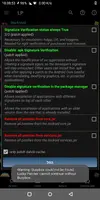

Randomisation
New User
The only thing I can think of is, the apk you downloaded from somewhere on the internet is probably corrupted. That happened to me a bunch of times to be honest. Rooted device with LP already applied those 3 patches, couldn't install unsigned nor signed apk(cuz the apk was corrupted during download)
OP
OP
I did try with an apk that i unsigned it with the lib file trick still not workedThe only thing I can think of is, the apk you downloaded from somewhere on the internet is probably corrupted. That happened to me a bunch of times to be honest. Rooted device with LP already applied those 3 patches, couldn't install unsigned nor signed apk(cuz the apk was corrupted during download)
Randomisation
New User
Have you tried using the LP module? In Xposed. I don't know how Xposed nor LP works right now, since my old phone broke and my new phone can't even root and test both Xposed and LP. Also, just asking.. are you trying to install that unsigned apk over an original apk?
OP
OP
Im not sure what u mean , can u name the module?Have you tried using the LP module? In Xposed. I don't know how Xposed nor LP works right now, since my old phone broke and my new phone can't even root and test both Xposed and LP.
Randomisation
New User
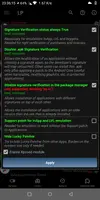
If you have Xposed, and LP installed. I think LP module will appear in Xposed and you just need to enable it. That's how I remember it, back then.
OP
OP
This is what i haveIf you have Xposed, and LP installed. I think LP module will appear in Xposed and you just need to enable it. That's how I remember it, back then.
Attachments

Setterwing
Active Member
@BenShitrit Are you trying to install a moded app on top of the original playstore one? Ignore all that part about unsign apk simply download the mod and install as it is, those lucky patchers are meant to skip sign cerification so no need fot extra steps
OP
OP
Yeah but even when I'm trying to install unsigned just like that i cant , and it's important to me because some games i wanna sign with google play@BenShitrit Are you trying to install a moded app on top of the original playstore one? Ignore all that part about unsign apk simply download the mod and install as it is, those lucky patchers are meant to skip sign cerification so no need fot extra steps
Setterwing
Active Member
Like i said no need to unsign the mod. Install the game from the playstore, log in with google close the game and install the mod as you download on top of it. Those patches you did already disable signature checking so it lets the mod overwrite the normal game dispite having different signatures.Yeah but even when I'm trying to install unsigned just like that i cant , and it's important to me because some games i wanna sign with google play
OP
OP
It's not working for me in king's raid for exampleLike i said no need to unsign the mod. Install the game from the playstore, log in with google close the game and install the mod as you download on top of it. Those patches you did already disable signature checking so it lets the mod overwrite the normal game dispite having different signatures.
Setterwing
Active Member
OP
OP
Download the original game from store, sign in via Google play,install modded over the original oneWeird worked fine for me... Mind telling me what were your steps?
Setterwing
Active Member
And when you try to instal the mod it says it couldnt install?Download the original game from store, sign in via Google play,install modded over the original one
OP
OP
YeahAnd when you try to instal the mod it says it couldnt install?
Setterwing
Active Member
Really have no idea, i just tried with the kings raid and installed perfectly fine on top of the clean one, the only thing i can think of is that error showing in your first pic of lucky patcher and busybox (no idea how to fix it never had that one) try to reinstall lucky patcher and reinstall those patches.Yeah

Download the original game from store, sign in via Google play,install modded over the original one
Make sure the play store version and the mod version are the same, if the play version has had a minor patch which didn't need a full update the mod version maybe older. Lucky patcher doesn't always work with backwards updates since android 6 came out.
If you use es file explorer and select the apk it will show you the version and a little number in brackets the mod needs to be the same ora higher number so it is an update rather than a downgrade.
Grab the original playstore apk from apkpure and you can grab an older one further Downthe page


Good timing for me to come to this Thread, I probably Face the Same Issue.
Except!
Before Patching the 3 Patches LP mentioned something about the Odexed Services.Jar
Being the Genius that I am, I Patched it Anyways, No Problems Booting Up but Couldnt Install ANY Apps (Not Via Google Play not Even Fresh Installing Signed & Unsigned Apk)
So I removed the Patch, Deodexed the Jar and Patched again. Same Problem, Couldnt Install ANY Apps.
Installed Xposed tried to Enable Disable Signature Verification in Package Manager, Couldnt Install Any Apps
Only the First 2 Patches Work for me apparently
Why did i write a Whole story out
Except!
Before Patching the 3 Patches LP mentioned something about the Odexed Services.Jar
Being the Genius that I am, I Patched it Anyways, No Problems Booting Up but Couldnt Install ANY Apps (Not Via Google Play not Even Fresh Installing Signed & Unsigned Apk)
So I removed the Patch, Deodexed the Jar and Patched again. Same Problem, Couldnt Install ANY Apps.
Installed Xposed tried to Enable Disable Signature Verification in Package Manager, Couldnt Install Any Apps
Only the First 2 Patches Work for me apparently
Why did i write a Whole story out

Shared Object
New User
Who use Lucky Patcher in 2k19? Btw if you have Xposed use it modules for that like this: DSV | Xposed Module Repository
Working for me .
.
Working for me
.
bagheera
New User
its suppose to but it hasnt worked this way for me for a long time.Like i said no need to unsign the mod. Install the game from the playstore, log in with google close the game and install the mod as you download on top of it. Those patches you did already disable signature checking so it lets the mod overwrite the normal game dispite having different signatures.
Share: