cant log in google play usinng moded apk

ghostwhisper

Member
119
11/29/15
21
Thread Author
hi guys i have my cel rooted
lucky patcher instaled and busy box working
have an moded apk for loones tunes word of mayhem
but when l try to log in whit google play i cant =/ why is that?
 
You have not followed the guide properly. You can never login to Google when using a modded apk, you need to login to Google using an original APK then use an unsigned mod to trick your device into believing it is still using the original.
This is why you need lucky patcher to allow the Install of an unsigned apk
 
You have not followed the guide properly. You can never login to Google when using a modded apk, you need to login to Google using an original APK then use an unsigned mod to trick your device into believing it is still using the original.
This is why you need lucky patcher to allow the Install of an unsigned apk

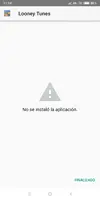
but the issue its i have the play store version instaled and loged, but when i try to install the moded versión (unsigned) at the end show me error app not instaled)
and that error showme on every unsigned mod when i try to install it over the plastoreversion
 

Attachments

  • Screenshot_2019-01-03-11-14-23-938_com.google.android.packageinstaller.webp
    Screenshot_2019-01-03-11-14-23-938_com.google.android.packageinstaller.webp
    11.7 KB · Views: 287
  • Screenshot_2019-01-03-11-13-44-213_ru.MJfANOUw.ahVorfFLu.webp
    Screenshot_2019-01-03-11-13-44-213_ru.MJfANOUw.ahVorfFLu.webp
    86.3 KB · Views: 287
The patches on lucky patcher don't always work with Android versions over 6. The one I know is still buggy is the option to downgrade, if you try to install an older APK version the error will throw up. Get the same version original APK for m apkpure and test it otherwise there may be a compatibility issue with lucky patcher and your device
 
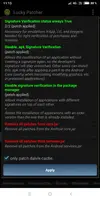
Luckypatcher is currently bugged on versions above 7. I recommend not using the new releases of 8.X.X (specifically "disable signature verification in the package manager" is displayed as enabled at first on, but it really is not).

Use this one(7.6.1), which works perfectly fine; File sharing and storage made simple.
 
Most app need to be signed before you can use it. I used to play around with some of the MTCBLUTOOTH.apk and other apk on systems. I have to use ZipSigner to sign it and then put it in the system/app folder of your root directory. Reboot and it should work. Make sure you don't have the old apk file in there otherwise your new one won't show up.


Bluestacks Kodi Lucky Patcher
 
Last edited:
Back
Top Bottom