

Exclusive ヘブンバーンズレッド Heaven Burns Red v6.4.0 [3+ FEATURES]
You are using an out of date browser. It may not display this or other websites correctly.
You should upgrade or use an alternative browser.
You should upgrade or use an alternative browser.

evrteaaw
New User

zerocxz
VIP
ftar
New User


finch_android
New User
[Attachment removed from Quotes]
Name: ヘブンバーンズレッド Heaven Burns Red
Version: 2.10.0
Root: No
Mod features:
1. Weak enemies
2. EXP multiplier
Install Steps:
1. Download & Install mod
2. Enable "DRAW OVER" or "DISPLAY POP-UP WINDOW" permission (if Android 6+)
3. Enable storage permission
4. Enjoy!
HOW TO ENABLE PERMISSION ON ANDROID
WHY BLACK/WHITE SCREEN/CRASHED ?
- Open device "Settings"
- Go to APPS
- Scroll down to desired APP and TAP IT
- Go to "OTHER PERMISSIONS" or "ADVANCED PERMS" and tick "DRAW OVER" or "DISPLAY POP-UP WINDOW"
GAME STILL CRASHED, HOW TO SEND LOGS ?
- Enable STORAGE permission
- Mod does not support VM
- Remove gameguardian or any similar memory tool
- Remove adblocker
- Some device has battery optimization, disable it
- Go to folder /Android/data/game package name/files/mod_menu_crash_logs.txt
- Copy & paste or take a screenshot inside the logs, send it here
- Some device may have different dir (document files)
Think of it as a way to support me, I'm doing my best to keep them user friendly and not frequent. There is always one on start and after that one every 30mins! Think of it as a small contribution and not a pain in the ass.
VIP users will not see ads!
Credits: Jacknator
Telegram: Update news
Playstore Link: ヘブンバーンズレッド - Apps on Google Play
[Hidden content]
thanks for sharing![Attachment removed from Quotes]
Name: ヘブンバーンズレッド Heaven Burns Red
Version: 2.10.0
Root: No
Mod features:
1. Weak enemies
2. EXP multiplier
Install Steps:
1. Download & Install mod
2. Enable "DRAW OVER" or "DISPLAY POP-UP WINDOW" permission (if Android 6+)
3. Enable storage permission
4. Enjoy!
HOW TO ENABLE PERMISSION ON ANDROID
WHY BLACK/WHITE SCREEN/CRASHED ?
- Open device "Settings"
- Go to APPS
- Scroll down to desired APP and TAP IT
- Go to "OTHER PERMISSIONS" or "ADVANCED PERMS" and tick "DRAW OVER" or "DISPLAY POP-UP WINDOW"
GAME STILL CRASHED, HOW TO SEND LOGS ?
- Enable STORAGE permission
- Mod does not support VM
- Remove gameguardian or any similar memory tool
- Remove adblocker
- Some device has battery optimization, disable it
- Go to folder /Android/data/game package name/files/mod_menu_crash_logs.txt
- Copy & paste or take a screenshot inside the logs, send it here
- Some device may have different dir (document files)
Think of it as a way to support me, I'm doing my best to keep them user friendly and not frequent. There is always one on start and after that one every 30mins! Think of it as a small contribution and not a pain in the ass.
VIP users will not see ads!
Credits: Jacknator
Telegram: Update news
Playstore Link: ヘブンバーンズレッド - Apps on Google Play
[Hidden content]
HIROPPI
New User

shm48YrAKvWJFF
New User
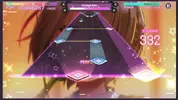
Hi, this game has a new game mode is 'concert'Updated to latest version!
can this also be modified?
like all perfect, no miss, always high score etc...
(this mode has a teaching mode, maybe from this begin to?
thanks for watching
Attachments
holis509
New User

Ibuki
New User


whywhatwho
New User


superpenkon
New User
[Attachment removed from Quotes]
名稱:ヘブンバーンズレッド 天灼紅
版本: 2.10.0
根:沒有
模組特點:
1.弱小的敵人
2.EXP乘數
安裝步驟:
1.下載並安裝模組
2. 啟用“繪製”或“顯示彈出窗口”權限(如果是 Android 6+)
3.啟用存儲權限
4. 享受吧!
如何在 Android 上啟用權限
為什麼黑屏/白屏/崩潰?
- 打開設備“設置”
- 前往應用程式
- 向下滾動到所需的應用程序並點擊它
- 轉到“其他權限”或“高級權限”並勾選“繪製”或“顯示彈出窗口”
遊戲仍然崩潰,如何發送日誌?
- 啟用存儲權限
- 模組不支持虛擬機
- 刪除 gameguardian 或任何類似的記憶工具
- 刪除廣告攔截器
- 有些設備有電池優化,禁用它
- 轉到文件夾/Android/data/遊戲包名/files/mod_menu_crash_logs.txt
- 在日誌中復制粘貼或截屏,發送到這裡
- 某些設備可能有不同的目錄(文檔文件)
將其視為支持我的一種方式,我正在盡最大努力使它們保持用戶友好且不頻繁。一開始總是有一個,之後每 30 分鐘一個!把它看作是一個小貢獻,而不是一個痛苦的屁股。
VIP用戶不會看到廣告!
[/劇透]
致謝:傑克納特
電報: 更新消息
Playstore Link: ヘブンパーンズレッド - Google Play 上的應用
[隱藏內容]
3個3qqqqqqqqqqqqqqqqqqqqqq
hjkim90113
New User
Thxs
As it worked first time, but after I entered the previous account, It dose not apply to the account
Post automatically merged:
As it worked first time, but after I entered the previous account, It dose not apply to the account
Last edited:

vaeweiaiyi8908
New User

missle0432
New User
shm48YrAKvWJFF
New User

A1212
New User
OP
OP


has new version
can you update that?
thx~
Original apk has been update
Thanks
You guys need open your eyes, pay attention on thread title. Its already been update 20hours ago lol
shm48YrAKvWJFF
New User
sorry, I didn't notice[Attachment removed from Quotes]
You guys need open your eyes, pay attention on thread title. Its already been update 20hours ago lol
thx for update
A1212
New User
lol, looks like I didn't check for updates carefully[Attachment removed from Quotes]
You guys need open your eyes, pay attention on thread title. Its already been update 20hours ago lol
 , sorry sir and thanks for mod
xyy837321213
New User
thx[Attachment removed from Quotes]
Name: ヘブンバーンズレッド Heaven Burns Red
Version: 2.11.0
Root: No
Mod features:
1. Weak enemies
2. EXP multiplier
Install Steps:
1. Download & Install mod
2. Enable "DRAW OVER" or "DISPLAY POP-UP WINDOW" permission (if Android 6+)
3. Enable storage permission
4. Enjoy!
HOW TO ENABLE PERMISSION ON ANDROID
WHY BLACK/WHITE SCREEN/CRASHED ?
- Open device "Settings"
- Go to APPS
- Scroll down to desired APP and TAP IT
- Go to "OTHER PERMISSIONS" or "ADVANCED PERMS" and tick "DRAW OVER" or "DISPLAY POP-UP WINDOW"
GAME STILL CRASHED, HOW TO SEND LOGS ?
- Enable STORAGE permission
- Mod does not support VM
- Remove gameguardian or any similar memory tool
- Remove adblocker
- Some device has battery optimization, disable it
- Go to folder /Android/data/game package name/files/mod_menu_crash_logs.txt
- Copy & paste or take a screenshot inside the logs, send it here
- Some device may have different dir (document files)
Think of it as a way to support me, I'm doing my best to keep them user friendly and not frequent. There is always one on start and after that one every 30mins! Think of it as a small contribution and not a pain in the ass.
VIP users will not see ads!
Credits: Jacknator
Telegram: Update news
Playstore Link: ヘブンバーンズレッド - Apps on Google Play
[Hidden content]
Share: