


Outdated KING`s RAID v5.10.0 [6+ FEATURES]
- Thread starter Jacknator
- Start date
You are using an out of date browser. It may not display this or other websites correctly.
You should upgrade or use an alternative browser.
You should upgrade or use an alternative browser.
LEETENSAN
New User
[Attachment removed from Quotes]
Name: KING`s RAID
Version: 5.10.0
Root: No
Mod features:
1. Unlimited damage
2. Unlimited defense
3. Autowin
4. Unlimited skill
5. Weak enemy
6. Dumb enemy
Install Steps:
1. Download & Install mod
2. Enable "DRAW OVER" or "DISPLAY POP-UP WINDOW" permission (if Android 6+)
3. Enable storage permission
4. Enjoy!
HOW TO ENABLE PERMISSION ON ANDROID
WHY BLACK/WHITE SCREEN/CRASHED ?
- Open device "Settings"
- Go to APPS
- Scroll down to desired APP and TAP IT
- Go to "OTHER PERMISSIONS" or "ADVANCED PERMS" and tick "DRAW OVER" or "DISPLAY POP-UP WINDOW"
GAME STILL CRASHED, HOW TO SEND LOGS ?
- Enable STORAGE permission
- Mod does not support VM
- Remove gameguardian or any similar memory tool
- Remove adblocker
- Some device has battery optimization, disable it
- Go to folder /Android/data/game package name/files/mod_menu_crash_logs.txt
- Copy & paste or take a screenshot inside the logs, send it here
- Some device may have different dir (document files)
- Alternative way: Install matlogs app (required root device), open matlogs & click start record. Open the game wait for game crashed or few minutes and stop record.
Think of it as a way to support me, I'm doing my best to keep them user friendly and not frequent. There is always one on start and after that one every 30mins! Think of it as a small contribution and not a pain in the ass.
VIP users will not see ads!
Credits: Jacknator
Telegram: Update news
Playstore Link: KING`s RAID - Apps on Google Play
[Hidden content]
csn0527
Member

Karolina protesenko
New User
[Attachment removed from Quotes]
Nome: RAID do KING
Versão: 5.10.0
Raiz: Não
Recursos do mod:
1. Danos ilimitados
2. Defesa ilimitada
3. Autowin
4. Habilidade ilimitada
5. Inimigo fraco
6. Inimigo burro
Etapas de instalação:
1. Baixe e instale o mod
2. Habilite a permissão "DRAW OVER" ou "DISPLAY POP-UP WINDOW" ( se Android 6+ )
3. Ative a permissão de armazenamento
4. Aproveite!
COMO ATIVAR PERMISSÃO NO ANDROID
POR QUE TELA PRETA/BRANCA/TRAVA?
- Abra as "Configurações" do dispositivo
- Ir para APLICATIVOS
- Role para baixo até o APP desejado e TAP IT
- Vá para "OUTRAS PERMISSÕES" ou "PERMISSÕES AVANÇADAS" e marque "DESENHAR" ou "EXIBIR JANELA POP-UP"
JOGO AINDA TRAVOU, COMO ENVIAR LOGS?
- Habilitar permissão STORAGE
- Mod não suporta VM
- Remova o gameguardian ou qualquer ferramenta de memória semelhante
- Remover adblocker
- Algum dispositivo possui otimização de bateria, desative-o
- Vá para a pasta /Android/data/nome do pacote do jogo/arquivos/mod_menu_crash_logs.txt
- Copie e cole ou faça uma captura de tela dentro dos logs, envie aqui
- Alguns dispositivos podem ter diretórios diferentes (arquivos de documentos)
- Maneira alternativa: Instale o aplicativo matlogs (dispositivo raiz necessário), abra o matlogs e clique em iniciar registro. Abra o jogo, espere o jogo travar ou alguns minutos e pare de gravar.
Pense nisso como uma forma de me apoiar, estou fazendo o possível para mantê-los amigáveis e não frequentes. Há sempre um no início e depois desse a cada 30 minutos! Pense nisso como uma pequena contribuição e não um pé no saco.
Usuários VIP não verão anúncios!
Créditos: Jacknator
Telegram: Atualizar notícias
Link Playstore: KING`s RAID - Apps no Google Play
[Conteúdo oculto]
Testar

hoshikawa
New User

busyhip
New User

luciferhas
New User

TakiBetlog
New User


Have you heard about our Lord and Savior ublock Origin?Annoying ads reach up to 20 but still wont let me download
[Attachment removed from Quotes]
OP
OP


the game closes as soon as it starts
Dont bother trying rn, any of my mod last update before july needs to fixAnnoying ads reach up to 20 but still wont let me download

Nandita
New User
sorrowking
Member
[Attachment removed from Quotes]
Name: KING`s RAID
Version: 5.10.0
Root: No
Mod features:
1. Unlimited damage
2. Unlimited defense
3. Autowin
4. Unlimited skill
5. Weak enemy
6. Dumb enemy
Install Steps:
1. Download & Install mod
2. Enable "DRAW OVER" or "DISPLAY POP-UP WINDOW" permission (if Android 6+)
3. Enable storage permission
4. Enjoy!
HOW TO ENABLE PERMISSION ON ANDROID
WHY BLACK/WHITE SCREEN/CRASHED ?
- Open device "Settings"
- Go to APPS
- Scroll down to desired APP and TAP IT
- Go to "OTHER PERMISSIONS" or "ADVANCED PERMS" and tick "DRAW OVER" or "DISPLAY POP-UP WINDOW"
GAME STILL CRASHED, HOW TO SEND LOGS ?
- Enable STORAGE permission
- Mod does not support VM
- Remove gameguardian or any similar memory tool
- Remove adblocker
- Some device has battery optimization, disable it
- Go to folder /Android/data/game package name/files/mod_menu_crash_logs.txt
- Copy & paste or take a screenshot inside the logs, send it here
- Some device may have different dir (document files)
- Alternative way: Install matlogs app (required root device), open matlogs & click start record. Open the game wait for game crashed or few minutes and stop record.
Think of it as a way to support me, I'm doing my best to keep them user friendly and not frequent. There is always one on start and after that one every 30mins! Think of it as a small contribution and not a pain in the ass.
VIP users will not see ads!
Credits: Jacknator
Telegram: Update news
Playstore Link: KING`s RAID - Apps on Google Play
[Hidden content]
tnk bro...

Yudayana809
New User
Somk2lexou
Member
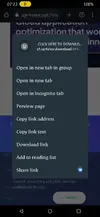
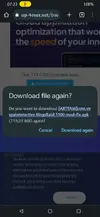
When you are at that page, you can hold and press that button , it will show you a menu, look in there and tap on "go to download link" and the download will startAnnoying ads reach up to 20 but still wont let me download
[Attachment removed from Quotes]
Post automatically merged:
Like this
Attachments

Cut78
New User
1039621948
New User
ZoRoiT
New User

NamaKo
New User


pillow001
New User
Share: