

Outdated Last Day On Earth 1.7.7 Mod Max Coins,Magic Split,Craft Points,Materials,Durability [For Unroot]
- Thread starter KingAtlantis
- Start date
You are using an out of date browser. It may not display this or other websites correctly.
You should upgrade or use an alternative browser.
You should upgrade or use an alternative browser.
- Status
- Not open for further replies.


Toshi
New User
If you cannot run the save, then try the following steps:
1. Run my mod once without any save, must do this step.
2. Rename my save folder to zombie.survival.craft.z.abc
3. Then place in under Storage/Andriod/Data/
Tried this but still stuck in loading screen

bobturismo
New User
Touch the upper right hand corner, like it is explained in the original postI can't run the game after installing. Stuck on this screen. Broken Link
Hey havent dont this before and am having issues like what is the use of the zip file 92lv??
It's someone else's saved data, you do not need it if you don't want.
This saved game has level 92 and a full house built with chests full of guns and armor
Last edited:
bobturismo
New User
The work around is to install the app (it's some sort of Chinese marketplace), then it will bypass that screen as long as it's installed. Since you are rooted, I would disable all of its permissions.I tried that. I tried to touch like almost everywhere but it just wouldn't close. At the bottom, if I tap on it, it'll try to install something. Using rooted note 5.
Edit - Funny tapping on top right corner on emulator will do the job but on my note 5, it doesn't do anything. Anyone having that problem?
Do you have any apps installed on the note that draw over the screen? Like a dimming app or controller app?

wtfisthis
New User
The work around is to install the app (it's some sort of Chinese marketplace), then it will bypass that screen as long as it's installed. Since you are rooted, I would disable all of its permissions.
Do you have any apps installed on the note that draw over the screen? Like a dimming app or controller app?
Thanks for the help. I was able to manage to close it on my phone using my s-pen.

jeckerz
New User
Found out the cause of the 98%, save file not working sometimes. Its due to the connection. If its data it doeant work if its cutting in and out. But if its wifi that has a stable connection it works. =)
LewisB96
New User
Any way to dupe items? Getting engine parts for the ATV is a pain in the a*s.. 200 parts is gonna take me forever -_-
Mod is awesome!!
Mod is awesome!!
bobturismo
New User
IF YOU ARE GETTING STUCK IN THE LOADING SCREEN.
This is really only 3 steps:
1. Backup your saved file
2. Uninstall EVERYTHING, install mod apk, start game and exit
3.
____a. Copy .sdat files from the custom 92 lvl save and overwrite/merge them onto the games .sdat files
____b. Copy .sdat files from your backup save and overwrite/merge them onto the games .sdat files
1. Backup your save file under Android/data "zombie.survival.craft.z" OR "zombie.survival.craft.z.abc" , you will need to do this even if you saved your game through Google play. You will NOT be able to sign in to Google play on any modded apk
Just make a new folder labeled "ldoe backup" and paste "zombie.survival.craft.z" in there
2. Uninstall EVERYTHING and install the MOD
Start the game, pick which server you normally use.
The Google play box will appear and disappear, this is normal, you will not be able to sign in using any modded apk
If you saved your game through Google play, you will need to backup your game "copy" "pasting" zombie.survival.craft.z (as mentioned in step 1.)
3. After you start a new game and exit without picking up anything.
DO NOT DELETE "Android/data/zombie.survival.craft.z."
_____ 3a. If you want to use the custom lvl 92 save file instead of continuing your original game (which you can go restore later if you want to):
Copy all of the .sdat files from the 92lvl save inside of
"Last Day On Earth 92lv Save_Atlantis.zip/zombie.survival.craft.z/fileszombie.survival.craft.z/files"
You may have to extract these first. Using "FX or ES or X-plore " file managers I did not have to extract first, you can copy right out of the zip. (there's like 57 or something .sdat files) and
overwrite/merge them onto the .sdat files under "Android/data/zombie.survival.craft.z/files" OR "Android/data/zombie.survival.craft.z.abc/files"
(If you started from scratch, there shouldn't be any .abc , if there is, I would recommend starting from scratch.
_____ 3b. If you want to continue your original saved game instead of the lvl 92 custom saved game:
Copy the .sdat files from your "ldoe backup/zombie.survival.craft.z/files" instead and paste those into "Android/data/zombie.survival.craft.z/files" OR "Android/data/zombie.survival.craft.z.abc/files"
Also your "zombie.survival.craft.z" folder might also be called "zombie.survival.craft.z.abc" the game will add the abc if there is all ready another folder there instead of copying over it when you install the game. You may need to add or delete the .abc
For me, whenever there is an update, copying only the.sdat files is how I've gotten it to work. Transferring between my laptop and phone, you can copy the whole "zombie.survival.craft.z" folder. I think because the game versions are the same, it's whenever there is a game update and you are trying to restore a save from an older version I've had problems.
Also, if it doesn't work the first time, try reseting the game AGAIN a few times.
Found out the cause of the 98%, save file not working sometimes. Its due to the connection. If its data it doeant work if its cutting in and out. But if its wifi that has a stable connection it works. =)
I noticed on my emulator on my laptop it needed to be connected to the internet, that is one cause of the problem, I believe there are multiple reasons for the stuck loading as my phone is always hooked up to the internet
Any way to dupe items? Getting engine parts for the ATV is a pain in the a*s.. 200 parts is gonna take me forever -_-
Mod is awesome!!
On a rooted phone you would use "game guardian", unfortunately this is the first phone that I've owned that cannot be rooted. I have not yet tried on my laptop with rooted emulator yet for this version. I believe someone had mentioned that GG wasn't working for this version? It's hard to tell with the poor grammer or bad language translation.
Last edited:
OP
OP

IF YOU ARE GETTING STUCK IN THE LOADING SCREEN.
1. Backup your save file under Android/data "zombie.survival.craft.z" OR "zombie.survival.craft.z.abc" , you will need to do this even if you saved your game through Google play. You will NOT be able to sign in to Google play on any modded apk
Just make a new folder labeled "ldoe backup" and paste "zombie.survival.craft.z" in there
2. Uninstall EVERYTHING and install the MOD
Start the game, pick which server you normally use.
The Google play box will appear and disappear, this is normal, you will not be able to sign in using any modded apk
If you saved your game through Google play, you will need to backup your game "copy" "pasting" zombie.survival.craft.z (as mentioned in step 1.)
3. After you start a new game and exit without picking up anything.
DO NOT DELETE "Android/data/zombie.survival.craft.z."
_____ 3a. If you want to use the custom lvl 92 save file instead of continuing your original game (which you can go restore later if you want to):
Copy all of the .sdat files from the 92lvl save inside of
"Last Day On Earth 92lv Save_Atlantis.zip/zombie.survival.craft.z/fileszombie.survival.craft.z/files"
You may have to extract these first. Using "FX or ES or X-plore " file managers I did not have to extract first, you can copy right out of the zip. (there's like 57 or something .sdat files) and
overwrite/merge them onto the .sdat files under "Android/data/zombie.survival.craft.z/files" OR "Android/data/zombie.survival.craft.z.abc/files"
(If you started from scratch, there shouldn't be any .abc , if there is, I would recommend starting from scratch.
_____ 3b. If you want to continue your original saved game instead of the lvl 92 custom saved game:
Copy the .sdat files from your "ldoe backup/zombie.survival.craft.z/files" instead and paste those into "Android/data/zombie.survival.craft.z/files" OR "Android/data/zombie.survival.craft.z.abc/files"
Also your "zombie.survival.craft.z" folder might also be called "zombie.survival.craft.z.abc" the game will add the abc if there is all ready another folder there instead of copying over it when you install the game. You may need to add or delete the .abc
For me, whenever there is an update, copying only the.sdat files is how I've gotten it to work. Transferring between my laptop and phone, you can copy the whole "zombie.survival.craft.z" folder. I think because the game versions are the same, it's whenever there is a game update and you are trying to restore a save from an older version I've had problems.
Also, if it doesn't work the first time, try reseting the game AGAIN a few times.
I noticed on my emulator on my laptop it needed to be connected to the internet, that is one cause of the problem, I believe there are multiple reasons for the stuck loading as my phone is always hooked up to the internet
On a rooted phone you would use "game guardian", unfortunately this is the first phone that I've owned that cannot be rooted. I have not yet tried on my laptop with rooted emulator yet for this version. I believe someone had mentioned that GG wasn't working for this version? It's hard to tell with the poor grammer or bad language translation.
Thanks a lot for your assistance for explaining it to fellas.
Also, guys, my 92lv is not compulsory for making the mod work, feel free to play my mod with your own save. I shared it because I had known some of you might have crashed your own save by equiping the unreleased items.
Besdies, it is extrememly important to uninstall the current game before installing my mod. As well as running the game once right after installing before pasting any save to it.

Shot
New User
Then you have to make a choice, bro. But I can promise you that Chinese app is not kind of virus, it is just a Chinese game appstore that makes Mod games.
When I click on it it force close
Can't download that Chinese mod meaning I can't play
OP
OP
You can bypass it by clicking the top right concern of the ad.When I click on it it force close
Can't download that Chinese mod meaning I can't play
bobturismo
New User
No prob, you can use any of that If you wantThanks a lot for your assistance for explaining it to fellas.
Also, guys, my 92lv is not compulsory for making the mod work, feel free to play my mod with your own save. I shared it because I had known some of you might have crashed your own save by equiping the unreleased items.
Besdies, it is extrememly important to uninstall the current game before installing my mod. As well as running the game once right after installing before pasting any save to it.
Shot
New User
Thanks for I occur this problemYou can bypass it by clicking the top right concern of the ad.
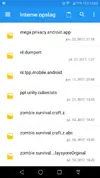
I replaced the mod data, but now it's on level on at beginning. There's the ABC one now every time I switch one I stay at level 1, also when I add my original Playstore files in, IT stays at level 1 now
Attachments
OP
OP
You just need to paste your save under .abc folder. It is the mod folder and delete the other 2 as it will affect the mod to load its progress, at least don't put them under the same folder. So just keep the .abc folder.Thanks for I occur this problem
I replaced the mod data, but now it's on level on at beginning. There's the ABC one now every time I switch one I stay at level 1, also when I add my original Playstore files in, IT stays at level 1 now

Con Cu
New User
bobturismo
New User
Hey fck, i cant install
Uninstall any and all versions of the game first

azraelzee
New User
To the ones who destroyed their saved files and want a new saved game with lvl 98 (just need 500exp to 99) and with 750,00 coins (never deal with negative coins again) and 148 research points ( also so we don't suffer the negative)
Other than those, everything else is untouched so you can enjoy building your own base and crafting your own stuff.
Just download the zip file, extract it and then copy everything to Android/data/zombie.survival.craft.z.abc/files
You won't get stuck at loading screen, promise.
Download Extract zip
Other than those, everything else is untouched so you can enjoy building your own base and crafting your own stuff.
Just download the zip file, extract it and then copy everything to Android/data/zombie.survival.craft.z.abc/files
You won't get stuck at loading screen, promise.
Download Extract zip
Last edited:
Manussko
New User
Working! Thanks m8. Excelent work. And Thanks to the mod maker too . Good job guys !To the ones who destroyed their saved files and want a new saved game with lvl 98 (just need 500exp to 99) and with 750,00 coins (never deal with negative coins again) and 148 research points ( also so we don't suffer the negative)
Other than those, everything else is untouched so you can enjoy building your own base and crafting your own stuff.
Just download the zip file, extract it and then copy everything to Android/data/zombie.survival.craft.z.abc/files
You won't get stuck at loading screen, promise.
Download Extract zip


Guys his mod is working very fine. I have tested this mod in 4 of my different devices and they all work like a charm. It's YOUR device that has the issue, don't blame the mod.
Shot
New User
You just need to paste your save under .abc folder. It is the mod folder and delete the other 2 as it will affect the mod to load its progress, at least don't put them under the same folder. So just keep the .abc folder.
Thank you, it worked
Can I ask another thing, on at -2250 coins
How to get in positive?
- Status
- Not open for further replies.
Share: