OP
OP





Amazing my friend, works like a charm. Thank you friend. I did have to reinstall the normal app from the store and login, then installed your version untop of it and it worked. Awesome buddyUnsigned fixed
Well this is annoying part when using google login, google login always get kicked out after reopen apps. You need repeat the process everytime this happenRIP, spoke to soon. It worked once. Game crashed and now I can get back into the original account. This is weird.
Gotcha, I mean its better then nothing, but until they had a different login method, im kinda cursed into this. Only way to get into the account. Funily enough, the prvious unsigned version, the game would crash after 10-15mins same as now, but I could log back in no problem. Weird bugs.Well this is annoying part when using google login, google login always get kicked out after reopen apps. You need repeat the process everytime this happen
If still not login, reboot device and repeat
Sounds like ads problem to me, make sure no adblocker or anything that might block my adsthe game would crash after 10-15mins same as now
That would be surprising, I always saw the adds before no problems. and its a pretty bare bones LdPlayer emulator. Nothing else but that modded game on it. aside from LP of courseSounds like ads problem to me, make sure no adblocker or anything that might block my ads
That would be surprising, I always saw the adds before no problems. and its a pretty bare bones LdPlayer emulator. Nothing else but that modded game on it. aside from LP of course
Not much point atm, I can log into the Google play account 1 out of 20 times I try. I tried a different unsigned mode and it signs in no problem. If I get yours to work Ill see if it crashes again.Download matlog(make sure your device is rooted) and start record the logs before enter game, after the game crash.. stop record and send me the logs
Lol what ? Thats the reason crashlogs needed, i need to see what causing it crash. If u think this "no point" we can end this conversation now tyNot much point atm, I can log into the Google play account 1 out of 20 times I try. I tried a different unsigned mode and it signs in no problem. If I get yours to work Ill see if it crashes again.
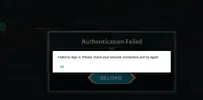
Sorry, maybe I expressed myself poorly im sorry. The game isnt crashing like before, now it simply gets block during the google play connect. Says it has a connection error and it restart the application. If you think it can be help to record it I will.Lol what ? Thats the reason crashlogs needed, i need to see what causing it crash. If u think this "no point" we can end this conversation now ty
 Anyway how u guys login gmail ? Just install unsigned apk and pray rng to login ?
Can login google without a sweat here

[Attachment removed from Quotes]
Name: LotR: Heroes of Middle-earth™
Version: 1.5.3.1310663
Root: No
Mod features:
1. Unlimited damage
2. Unlimited defense
3. Easy win
Install Steps:
1. Download & Install mod
2. Enable "DRAW OVER" or "DISPLAY POP-UP WINDOW" permission (if Android 6+)
3. Enable storage permission
4. Enjoy!
HOW TO ENABLE PERMISSION ON ANDROID
WHY BLACK/WHITE SCREEN/CRASHED?
- Open device "Settings"
- Go to APPS
- Scroll down to desired APP and TAP IT
- Go to "OTHER PERMISSIONS" or "ADVANCED PERMS" and tick "DRAW OVER" or "DISPLAY POP-UP WINDOW"
GAME STILL CRASHED, HOW TO SEND LOGS?
- Enable STORAGE permission
- Remove gameguardian or any similar memory tool
- Remove adblocker
- Some device has battery optimization, disable it
- Go to folder /Android/data/game package name/files/mod_menu_crash_logs.txt
- Copy & paste or take a screenshot inside the logs, send it here
- Some device may have different dir (document files)
- Alternative way: Install matlogs app (required root device), open matlogs & click start record. Open the game wait for game crashed or few minutes and stop record.
Think of it as a way to support me, I'm doing my best to keep them user friendly and not frequent. There is always one on start and after that one every 30mins! Think of it as a small contribution and not a pain in the ass.
VIP users will not see ads!
Credits: Jacknator
Telegram: Update news
Playstore Link: LotR: Heroes of Middle-earth™ - Apps on Google Play
[Hidden content]