


Exclusive Marvel Strike Force - Squad RPG v6.1.3 - TeamAR gift
- Thread starter BTG
- Start date
You are using an out of date browser. It may not display this or other websites correctly.
You should upgrade or use an alternative browser.
You should upgrade or use an alternative browser.
- Status
- Not open for further replies.
nopepeepee
New User
Replace base.apk ALWAYS delete the game when I reboot device after.you can use emulators or real devices with this mod, but you MUST install original from playstore and then do all the steps in installation instruction (front page). If you're lucky then you still have the mod listed after reboot, if you're not so lucky, your Android might remove the game completely.
For any of you who wish to use the mod, I tested this mod on Nox 6.6.1.1008-5.1.1500200709 Android 5. I think this is the one but you can search on internet to find it: https://res06.bignox.com/full/20200...exe?filename=nox_setup_v6.6.1.1_full_intl.exe
Anyway, sorry not much I can help at the moment with this game, but as said, at least the mod is available for you to try out.
Once you manage to run the mod and get inside the game, then you can login (account icon > facebook > login with facebook > then it will restart the game > then you should be logged in)
Good luck
edit: just realized, you also need LuckyPatcher patch to Android with 3 options enabled.
Steps below:
1) load LP
2) give LP root access...everything else it asks, just say no (no to update, no to whatever)
3) bottom screen, select 2nd item "toolbox"
4) scroll down on 7th item select "Patch to Android"
5) tick the first 2 (signature verification always true and disable signature verification) and then click apply
6) your android should be auto reboot
7) load LP again, repeat step above, this time tick the 3rd option (disable signature in package manager)
8) android will reboot again
9) install MSF PS version
10) replace base.apk
11) reboot android
12) play the mod — if you see menu there, ignore it, mod is applied without using menu
The above is tested on Android 5 and Android 7, on above Nox
Good luck
Edit: okay, I tried the LP tricks, changed permissions, for the app to force close after. Poco F1 with Pixel Experience+ on Android 11.
Last edited:

Dibbasamad
New User
does anyone have this problem: no apk file in /data/app/com.foxnext.m3-1/ ? I tried Nox, Bluestack, LD player.
But dont see any apk file there to over right. How do I make my emulator show them?
But dont see any apk file there to over right. How do I make my emulator show them?
Dibbasamad
New User
If anyone wondering I'm attaching screenshot of my data folder, as you can see there is no apk file there.

Screw Scopley
New User
Same here. First I was getting stuck at 14% for a few attempts and then came to 36%.Still stuck at 36% even when following the instruction, anybody managed to make this work?
@BTG help us out here!
I think maybe the problem is with the internet speed. It needs to be fast . Maybe.

Liandhifi
New User
OP
OP


ok, let's see if any of you can try this out:
0. UNINSTALL MSF -- just to make sure we're starting clean
1. install game from playstore, load the game, bind/login/whatever, make sure you claim a few of those dailies
3. download and SAVE the mod to NOX's download folder, make sure the filename is "base.apk" without double-quote
4. download btg.sh.txt here (rename it to btg.sh !!!)
5. follow video below on how to install the mod (long press on btg.sh and select execute)
msf-install.avi - Android Download
6. reboot your nox and play
PS. nox in video is Android 5 -- any other android or emulator the sequence is very similar, but you MUST change/modify the content of btg.sh according to your emulator !!!
0. UNINSTALL MSF -- just to make sure we're starting clean
1. install game from playstore, load the game, bind/login/whatever, make sure you claim a few of those dailies
3. download and SAVE the mod to NOX's download folder, make sure the filename is "base.apk" without double-quote
4. download btg.sh.txt here (rename it to btg.sh !!!)
5. follow video below on how to install the mod (long press on btg.sh and select execute)
msf-install.avi - Android Download
6. reboot your nox and play
PS. nox in video is Android 5 -- any other android or emulator the sequence is very similar, but you MUST change/modify the content of btg.sh according to your emulator !!!
Attachments

Screw Scopley
New User

Undershady
New User
Not quite the right file you need /data/app/com.foxnextgames.m1/ it's only accessible through rooted device.If anyone wondering I'm attaching screenshot of my data folder, as you can see there is no apk file there.[Attachment removed from Quotes]
Here's some photos to show you.Not quite the right file you need /data/app/com.foxnextgames.m1/ it's only accessible through rooted device.
Still haven't got past the game crashing was able to copy the base.apk over without game deleting itself but going on 2 days now trying to get it to open. I changed the permissions aswell to rw-r-r. Patched the three lucky patches before starting any of it to make sure the license verification was where it needed to be. So what am I missing @BTG
Attachments
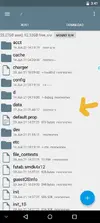
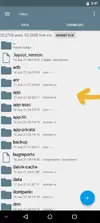
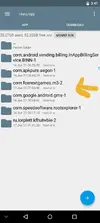
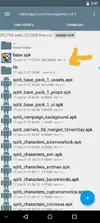
Gnod
New User
OP
OP
You need to login and play the original game first, to make sure that you can get inside the game, before you put the mod. Maybe give it a try again. If you try on nox, you can follow the video and steps that I put there, just to see if you can get into the mod?Not quite the right file you need /data/app/com.foxnextgames.m1/ it's only accessible through rooted device.
Here's some photos to show you.
Still haven't got past the game crashing was able to copy the base.apk over without game deleting itself but going on 2 days now trying to get it to open. I changed the permissions aswell to rw-r-r. Patched the three lucky patches before starting any of it to make sure the license verification was where it needed to be. So what am I missing @BTG

PixarMan
New User
I am using bluestacks v 4.280.0.1022, Nougat 32-bit!
According to the instructions in the header, everything worked out and works without problems, like the previous version 5.3.0! Thanks BTG!)))
According to the instructions in the header, everything worked out and works without problems, like the previous version 5.3.0! Thanks BTG!)))
Gopherit06
Member
I just wanted to say thank you for this mod and GREATLY appreciate you still working on this continuously. Thanks again and got it to work doing the steps on the first page 
Gnod
New User
Gopherit06
Member
cosmos
New User
OP
OP

XanZilla
Member
OP
OP
- Status
- Not open for further replies.
Share: