Exclusive Marvel Strike Force - Squad RPG v6.1.3 - TeamAR gift

Status
Not open for further replies.
Sorry to ping you again mister @BTG, the instructions to use this mod are:

Install original game
Download apk and sh files
Rename the apk to "base.apk" and then execute the sh file
And move the base.apk to data/foxnextgames-1 and replace the original base.apk
Close emulator

Is that all? Cause i really dont want to mess up, im exited to use this mod so i want to make sure i use it right, i am not sure if i replace the base.apk in the original playstore app or i need to install the mod apk and then replace
 
Sorry to ping you again mister @BTG, the instructions to use this mod are:

Install original game
Download apk and sh files
Rename the apk to "base.apk" and then execute the sh file
And move the base.apk to data/foxnextgames-1 and replace the original base.apk
Close emulator

Is that all? Cause i really dont want to mess up, im exited to use this mod so i want to make sure i use it right, i am not sure if i replace the base.apk in the original playstore app or i need to install the mod apk and then replace
each emulator is different, that's why it's headache. as someone said above, you need to use certain "explorer" too if you're running on bluestacks.

if you go back a few pages from this post, where I put the btg.sh, you should find reference to nox that was working for this game. you can start from there, then you only need to :
1. install game fresh (not upgrade, must be fresh, e.g. uninstall then install from PS)
2. download apk and sh
3. rename to base.apk
4. execute sh
5. reboot
6. play game

i can't test on other emulators as I'm not having much of a time to visit the game, but please give the above a try first and see how you go. Some other members have success loading the game too, perhaps use their version of emulators or instructions, or PM them or perhaps they are willing to help you out by sharing their secrets....Good luck
 
Hey @BTG im trying to install it but everytime i replace the base.apk and restart the emulator, the app is deleted, what is happening? I searched the 28 pages for a solution but no luck

Edit:im using your nox version
 
Last edited:
Hey @BTG im trying to install it but everytime i replace the base.apk and restart the emulator, the app is deleted, what is happening? I searched the 28 pages for a solution but no luck

Edit:im using your nox version
you need to use that default file explorer that I show there, or install the file explorer that was mentioned in a few previous posts
 
you need to use that default file explorer that I show there, or install the file explorer that was mentioned in a few previous posts
I did, i followed the steps but the 3 times i tried, upon opening the emulator, the app is gone, i need to install it again
 
updated. enjoy
 
Is this app only for PC emulators? Just installed it on my phone, but stay on black screen and show message"the application dont respond".....
you need to follow the steps on front page, whether you're on emu or phone, no difference; you need rooted device irrespectively
 
each emulator is different, that's why it's headache. as someone said above, you need to use certain "explorer" too if you're running on bluestacks.

if you go back a few pages from this post, where I put the btg.sh, you should find reference to nox that was working for this game. you can start from there, then you only need to :
1. install game fresh (not upgrade, must be fresh, e.g. uninstall then install from PS)
2. download apk and sh
3. rename to base.apk
4. execute sh
5. reboot
6. play game

i can't test on other emulators as I'm not having much of a time to visit the game, but please give the above a try first and see how you go. Some other members have success loading the game too, perhaps use their version of emulators or instructions, or PM them or perhaps they are willing to help you out by sharing their secrets....Good luck
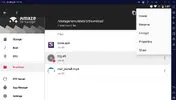
I have newest version of Nox 7.0.2 and have everything rooted, everything is downloaded on amaze file manager, i've done all those steps, but there is no execute button option for me for me on btg.sh
 
I have newest version of Nox 7.0.2 and have everything rooted, everything is downloaded on amaze file manager, i've done all those steps, but there is no execute button option for me for me on btg.sh
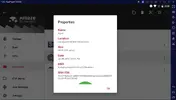
no idea, but you can try to click on the btg.sh "properties" and tick the "x" (for executable), then you should be able to right click again and execute
 
Screenshot_20220107-010302_Strike Force.webp
 
@BTG is the apk up to date? There's been loads of updates lately
I don't see them updating new APK -- is there an update required?

not load more why
you need to follow specific instructions to install this mod.... if you install the mod by dropping it/directly into your device, then it will FAIL.

anyway, tonight I will check if this game need updating and make a "guide" on how to install this. Good time for me to check latest Nox or whatever emulator.... Also good time to give Foxnext a visit :-)
 
I don't see them updating new APK -- is there an update required?


you need to follow specific instructions to install this mod.... if you install the mod by dropping it/directly into your device, then it will FAIL.

anyway, tonight I will check if this game need updating and make a "guide" on how to install this. Good time for me to check latest Nox or whatever emulator.... Also good time to give Foxnext a visit :)
@BTG
My bad! I installed late last night and tried for about 30 minutes without any luck. Tried loading 2-3 times just now and the current APK is good :)

Thank you again Sir for your work! Keep trying folks - I promise the reward is more than worth it!

Running NOX version 6.6.1.9 and did the following:

1- Uninstall so there's no version on the game on your device.

2- Download the game - play a round of anything just to confirm it works. Then close the game off fully using TASKS (PageUp) and the X button.

3- Press CTRL+4 to access FileAssist in NOX or use the shortcut on the right hand menu bar (Computer screen with a small rectangle in the top left)

4- Click the "open PC folder" button.

5- Drop the files from BTG into this directory.

6- Go to mainscreen of NOX and open "File Manager". In mine it's in one of the folders on the main screen.

7- Go to settings of "File Manager" and grant root access.

8- Navigate these folders > mnt > sdcard > download

9 - You should see the two files (base.apk and btg.sh)

10- Long left mouse button press on btg.sh and click execute.

11- Restart NOX

12- Open game (you'll see a new screen pop up) which takes focus away from the game so go to TASKS (PageUp) and click on marvel strike force. Then you just wait for it to load. **See Note Below**

13- Reap rewards!


**I've noticed my game doesn't load first time. It can take anything from 5-20 attempts to get signed in but it does work. I've had hangs at 13%, 20%, 30%, 33% most of the time. I just open multitask and close all the windows and try again.**

Sounds like a ball ache but it is 100% worth it - since getting it working I've made more progress in the game during a few days than I have in months on there previously! My roster is actually looking a bit impressive now!
 
Last edited:
  • Like
Reactions: BTG
no idea, but you can try to click on the btg.sh "properties" and tick the "x" (for executable), then you should be able to right click again and execute
Cannot find where to tik, but does anything look wrong with the screenshots
Nox.webpsh.webp
 
Status
Not open for further replies.
Back
Top Bottom