MH: Muffinator
Your personal mod manager — always up to date, always in your language
Version 0.4.1 · ● Free · Works on Android 7.0 and newer
What is MH: Muffinator
MH: Muffinator is a free Android app that brings Android Republic's game mods to your phone in one place. Instead of browsing the forum every time you want a mod, you open the app, find the game you want, and go straight to the download — that's it.
It works in 17 languages, looks great in both dark and light mode, and runs smoothly on any Android phone from 2016 onwards.
What can it do
- Browse mods — Scroll through the full catalog, search by game name, and see what's new or featured today
- Straight to the download — Each mod's download button takes you to the file wherever its author posted it, opening in your browser
- New: in-app downloads, where available — A mod's author can now also offer the file for download inside MH: Muffinator — a progress bar, then a one-tap install, no browser needed. It is up to each author, so not every mod has it: the button reads Download when it does and Open link when it does not
- In-app downloads are checked — Before a mod downloaded in the app can be installed, the app confirms the file arrived complete and unaltered. If anything is wrong it is deleted and you are told, rather than handed a broken file
- Never miss an update — MH: Muffinator tells you when a newer version of a mod you have installed is available, with a clear badge on the game card
- Save your favourites — Star the games you play most and reorder them any way you like
- See what's installed — The Installed tab shows only the mods you actually have on your phone, so you can launch them or check for updates at a glance
- App update alerts — When a new version of MH: Muffinator is available you'll see a notice. Tap it to download and install the update directly inside the app — no browser needed
- Smooth, snappy navigation — Each section on Home loads with its own progress indicator so you can see exactly what's still loading, and moving between tabs no longer flickers or jumps
- Community at your fingertips — A new Community section in the drawer collects all our channels in one place: Android Republic forum, the Muffin-HUB forum, Discord, Telegram, and YouTube — tap any card to open it
- Top Picks — A new drawer section ranking the ten games the community launches most, all-time, with medals for the top three. Tap any of them to open its page. It works offline too, and tells you how old the list is when it can't refresh
- Richer game pages — Game descriptions now display with proper formatting — bold text, lists, and line breaks instead of raw symbols — and the Downloads section shows the exact mod version right in its header, e.g. Downloads (1.2.3)
- Crisper artwork — Game icons and banners now load at the right resolution for your screen, so they look sharp on everything from a small phone to a tablet
- Asset packs are catalogued too — Some games ship extra data alongside the mod. Those now appear in the Downloads list instead of being missing entirely
- You decide what stays on your phone — Downloaded files can be cleared from Settings at any time, or removed automatically once the mod is installed
 Screenshots





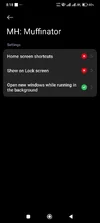
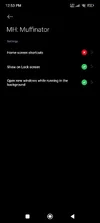
Home · Games Library · Game Details · Installed Games · Top Picks
 Is it safe to use
Yes. Your privacy and security matter to us:
- Minimal permissions. MH: Muffinator only asks for what it needs. No access to your contacts, camera, microphone, or other sensitive data.
- No personal data collected. We don't ask for your name, email, or any personal information. The app works with just a random device ID.
- Secure connections. All communication between the app and our servers is encrypted and verified to prevent tampering.
- Built-in protection. MH: Muffinator detects tools that try to interfere with how it works and will let you know if any are found.
 How to install
- Tap the download button below to get the APK file
- Open Settings on your phone → Apps → Special app access → Install unknown apps
- Allow installs from your browser or file manager (whichever you used to download)
- Open the downloaded APK file and tap Install
- Open MH: Muffinator — it sets itself up automatically in a few seconds
 Available in your language
MH: Muffinator is fully translated into 17 languages — every button, label, and message:
 English ·
  Español ·
  Italiano ·
  Français ·
  Deutsch
 Bahasa Indonesia ·
  한국어 ·
한국어 ·  中文 ·
中文 ·  Tiếng Việt ·
  Filipino
 日本語 ·
日本語 ·  Português ·
  Bahasa Melayu ·
  हिंदी ·
  Română ·
  Русский ·
  ภาษาไทย
The app picks your phone's language automatically. You can also change it manually any time in Settings.
Frequently Asked Questions
No. MH: Muffinator works without any account or sign-in. When you first open the app it quietly registers your device in the background — you won't even notice.
MH: Muffinator works on any Android phone or tablet running Android 7.0 (Nougat) or newer. That covers virtually every Android device made since 2016.
It also supports both 32-bit and 64-bit devices — ARM, ARM64, x86, and x86_64.
It also supports both 32-bit and 64-bit devices — ARM, ARM64, x86, and x86_64.
MH: Muffinator connects to our servers to fetch the game catalog and check for updates. It does not use your internet connection for anything else.
MH: Muffinator checks for tools that could interfere with how it works — such as certain proxy apps or memory editors. If one is found, the app will not start.
To use MH: Muffinator, simply uninstall the flagged tool and reopen the app.
To use MH: Muffinator, simply uninstall the flagged tool and reopen the app.
Go to Settings → App Settings → Theme and choose Light. The change takes effect immediately — no restart needed.
It scans the apps installed on your phone and shows only the games that are also in the MH: Muffinator catalog. If a newer mod version is available for any of them, you'll see an "Update available" badge — tap it to go straight to that game's downloads.
Open the game you want, scroll to the Downloads section, and tap the button. Each download tells you what will happen before you tap it:
Downloaded that mod in the app before? If the file is still on your phone, the app tells you when you downloaded it and offers to install it straight away, with Download again beside it if you would rather fetch a fresh copy.
- Open link — the usual way. This opens the mod's download page in your browser. Download the APK and install it the same way you installed MH: Muffinator
- Download — only on mods whose author also offers an in-app download. The file comes down inside the app with a progress bar. When it finishes, the app checks it is complete and undamaged, then offers to install it right there
Downloaded that mod in the app before? If the file is still on your phone, the app tells you when you downloaded it and offers to install it straight away, with Download again beside it if you would rather fetch a fresh copy.
That is normal, and Android asks it once. To install anything that did not come from the Play Store, Android needs your permission for the app doing the installing — in this case MH: Muffinator.
Tap through to the settings screen, turn the permission on, and come back. The app will pick up where it left off.
Tap through to the settings screen, turn the permission on, and come back. The app will pick up where it left off.
Some mods replace the original game rather than sitting beside it. Android will not install one over the other, because they are signed by different people — so the original has to go first.
Uninstalling removes that game's saved data. If your progress matters and is not backed up to the game's own account, back it up before you continue.
Uninstalling removes that game's saved data. If your progress matters and is not backed up to the game's own account, back it up before you continue.
Go to Settings → Download Cache → Clear download cache to remove every file the app has downloaded.
If you would rather not think about it, turn on Delete APK after install in the same section and each file is removed once the mod is actually installed.
If you would rather not think about it, turn on Delete APK after install in the same section and each file is removed once the mod is actually installed.
MH: Muffinator is free, and an occasional sponsor message helps pay for the servers and the hosting.
You may see one when you tap a download. Not every time, not the same sponsor again soon after, and nowhere else in the app — never on Home, never while you browse.
You can always skip it. Tap Skip, or just close it, and your download starts anyway — nothing is held back. If you do tap through, the page opens in your browser and your download carries on as soon as you come back to the app.
You may see one when you tap a download. Not every time, not the same sponsor again soon after, and nowhere else in the app — never on Home, never while you browse.
You can always skip it. Tap Skip, or just close it, and your download starts anyway — nothing is held back. If you do tap through, the page opens in your browser and your download carries on as soon as you come back to the app.
Please report it using the link in the Support section below. Include your Android version and a short description of what happened — screenshots help a lot!
 Core Features
- Clean, responsive design — Fast loading and smooth navigation on any Android phone
- Secure by default — Certificate-pinned HTTPS connections, device token authentication, and threat detection
- Checked downloads — Mods downloaded in the app are verified before you are offered the option to install them
- No account needed — Device registration happens automatically in the background on first launch
- Full offline support — Browse your favorites and installed games even without internet
- 17 languages included — English, Spanish, Italian, French, German, Indonesian, Korean, Chinese, Vietnamese, Filipino, Japanese, Portuguese, Malay, Hindi, Romanian, Russian, Thai
- Dark & Light themes — Switch instantly from Settings without restarting the app
 Support & Community
Having trouble? Found a bug? Want to chat? Open the Community section in the app drawer for every channel in one tap, or pick one below:
- Main forum (Android Republic): androidrepublic.org
- Muffin-HUB forum: forum.muffin-hub.org — app & module update tracker
- Discord: discord.gg/DQ5BtmzmAd — small server, app releases & announcements
- Telegram: t.me/androidrepublicnews — game releases & updates
- YouTube: @AndroidrepublicOrgz · @TheMuffin-HUB
- Email: dev@muffin-hub.org
MH: Muffinator is free. An occasional sponsor message helps keep it that way. · © 2026 Muffin HUB
Android is a trademark of Google LLC. MH: Muffinator is not affiliated with or endorsed by any game publisher.
Android is a trademark of Google LLC. MH: Muffinator is not affiliated with or endorsed by any game publisher.
Attachments


Last edited: