

1.Extract the obb, the obb folder name is always with com.xxx on android/data or android obbNope, i extracted the obb and placed it at Android/obb first, then i installed the modded apk.
2.Install apk
3.done


1.Extract the obb, the obb folder name is always with com.xxx on android/data or android obbNope, i extracted the obb and placed it at Android/obb first, then i installed the modded apk.

Yeap, i did all that, but sill cant. Sigh. Maybe its just my phone? Sigh.1.Extract the obb, the obb folder name is always with com.xxx on android/data or android obb
2.Install apk
3.done
Can you tell where did you put the obb file?for me this one works, but that error appeared with the game Otome of ikemen cafe ):
can you screen shot your obbWhy doesnt it work for me:sob:

HereCan you tell where did you put the obb file?
can you screen shot your obb

Try to install the game in playstore, after go to OBB folder and raname com.xxx and unistall apk and install modded version rename OBB back to originalHere
try to remove obb game and extract againI did that with the ikemen otome cafe game, but it says the same error, maybe the apk mod is corrupt? Or is my cell phone xD
I will make a video tuto but at the moment i'am occupied with job interviewCan someone explain the steps in more detail please? I keep doing it wrong :tearsofjoy::flushed::blush:
@BlackPanther Okay, ill help you. :blush:Can someone explain the steps in more detail please? I keep doing it wrong :tearsofjoy::flushed::blush:
Thank you very much. I've got it sorted so don't worry about the video. Good luck with your interview :blush:I will make a video tuto but at the moment i'am occupied with job interview
Thank you that was very helpful ! :blush:@BlackPanther Okay, ill help you. :blush:
1) Download the modded apk, not the one from xapk, but the one they uploaded here, the one below playstore version.
2) but dont install this apk. Instead, go to playstore and install the original app.
3) open the app for 10-15secs and close it.
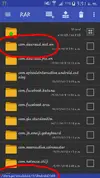
4) go to your Files>Android>Obb , and search for "com.dearead.mst.en". Rename the file to "com.xxx" and save it.
5) Uninstall the google playstore version after u rename the file and then install the modded apk u download earlier. But dont open the app yet!
6) go back to your files, and rename back the "com.xxx" to "com.dearead.mst.en" and save it.
7) and then u can start the app!
This method works for me! Hope it works for u too! :grin::relaxed:
No problem! :grin:Thank you that was very helpful ! :blush:


This is how I managed to run the mod apk in bluestacks 3 (rooted+luckypatcher):Why doesnt it work for me:sob:



 y)
y)