Hello, I just bought my 1st or 2nd Android phone. The 1st one was given to me 10 years ago, a Samsung Galaxy and I didn't like the OS3 so I never used it. But now with smartphones going for $1,000++ it's gotten to the point of ridiculousness.
I can find a very good $200.00 Android phone that is equal on performance with many $1,000 dollar phones on the market. So I picked up the ZTE Nubia Focus Pro 5G for $200.00 but you can find it as low as $150.00 bucks.
Thus, I needed to join this forum to ask some questions on customization. One thing that I immediately do to all of my new phones, computers, any electronic devices, etc. is that I shutdown all automatic updates for the system OS and all apps.
I know there will be some forum members trying to sell me on the idea of updates being a good thing, but honestly save it, you have a better chance of seeing a ghost than getting me to adopt updates which I haven't for 15 years and I have never had any problems with any of my systems, literally zero intrusions or breakdowns. And I've helped start a software company many years ago so I know what I'm doing is safe.
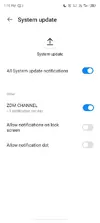
The ZTE comes preloaded with Android 13.0.2. Before I set up my wi-fi or put in sim cards. I went on YouTube tutorials to copycat all settings to disable updates on everything. The toggle to turn off automatic updates goes grey but doesn't actually turn off the update.
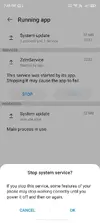
So I then discovered other menus like Running services that has a System update submenu. It's a Running app called ZdmService which I Stop and it deletes from the Running services menu. But it keeps popping up again. What is Zdm?
I've had this phone for only 1 month and have gone through 4 "Forced-Updates"
MyOS13.0.2
MyOS13.05
MyOS13.07
MyOS14.0.1
...and the phone is getting slower and slower operationally. I try not to power it down and restart it because then is when the forced update pushes through. So I can't seem to stop them. I hope someone here knows how to stop them perhaps? Thank you for reading.
I can find a very good $200.00 Android phone that is equal on performance with many $1,000 dollar phones on the market. So I picked up the ZTE Nubia Focus Pro 5G for $200.00 but you can find it as low as $150.00 bucks.
Thus, I needed to join this forum to ask some questions on customization. One thing that I immediately do to all of my new phones, computers, any electronic devices, etc. is that I shutdown all automatic updates for the system OS and all apps.
I know there will be some forum members trying to sell me on the idea of updates being a good thing, but honestly save it, you have a better chance of seeing a ghost than getting me to adopt updates which I haven't for 15 years and I have never had any problems with any of my systems, literally zero intrusions or breakdowns. And I've helped start a software company many years ago so I know what I'm doing is safe.
The ZTE comes preloaded with Android 13.0.2. Before I set up my wi-fi or put in sim cards. I went on YouTube tutorials to copycat all settings to disable updates on everything. The toggle to turn off automatic updates goes grey but doesn't actually turn off the update.
So I then discovered other menus like Running services that has a System update submenu. It's a Running app called ZdmService which I Stop and it deletes from the Running services menu. But it keeps popping up again. What is Zdm?
I've had this phone for only 1 month and have gone through 4 "Forced-Updates"
MyOS13.0.2
MyOS13.05
MyOS13.07
MyOS14.0.1
...and the phone is getting slower and slower operationally. I try not to power it down and restart it because then is when the forced update pushes through. So I can't seem to stop them. I hope someone here knows how to stop them perhaps? Thank you for reading.