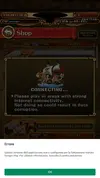
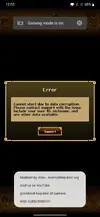
Did you enable storage perms and placed txt in the right place ?! Asking since it may happens loli did and result was the same, gonna try to reinstal nox.
EDIT: reinstalled the whole thing still get this
[Attachment removed from Quotes]


Did you enable storage perms and placed txt in the right place ?! Asking since it may happens loli did and result was the same, gonna try to reinstal nox.
EDIT: reinstalled the whole thing still get this
[Attachment removed from Quotes]

I completely missed the txt file part, it wasnt required last time i played. after struggling with getting it in to the right folder i got it to work thanks.Did you enable storage perms and placed txt in the right place ?! Asking since it may happens lol
Update about this:@XxXpumpXxX If you do not have infinite box enabled I think you can simply install the clean game and remove the modded one although you prefer to not to. If you have enabled infinite box and have more items than the limit when you open on the clean version you are detected as a cheater and have very high chances to get banned. So the following method is what I've thought.
I haven't tried myself but maybe doing what this thread says can help you. Some time ago I followed this Alternative Method #3 under "How to login to Google+ on modded games"
Method #3:
1. Delete "META-INF" from modded APK.
2. Copy "META-INF" from normal APK(From apkpure or similar site) to modded APK.
3. Sign the modded APK with zipsigner.
4. Install normal APK(From apkpure or similar site) and login with Google Play.
5. Install the signed mod APK over and launch the game.
Note: Please be sure to use the game version is the game!
to be able to login to Google+ in a game. It worked perfectly but unfortunately I haven't be able to check if payments were enabled because there are no in-app purchases. My guess is that if you are able to login to G+ then you should also get the shop to work. You should not need root to run zipsigner, the author of that thread doesn't specify it so I assume it is not required. Note: when there are new updates you have to repeat steps 1, 2, 3 and then overwrite the APK you get after step 3 over your game.
I can't try myself because I should put more than 1600 characters back to favourites and redownload all of their artworks (thanks to the last game update that requires to open character information to favourite it), this is also TM period so the time to do it is not very much. I'll see if I can try this method creating an account on another device when I have the time.
EDIT: if someone already tried a method similar to this or knows if it works please let us know so we avoid installing all of this game.

My bad, I thought there was new version but after rereading the the notice it doesn't say new version would be out. Just an in-game update.If its new version will be checked later during the day
new version available, its a forced update. ThxIf its new version will be checked later during the day
Are you sure you already have 9.6.1 installed? That's the last update and iAlex already shared new mod on July 10th.It is indeed a new version @iAlex , Forced update. Awaiting your update, as always thanks for your time and effort to keep this updated ♡ kisskiss
[Attachment removed from Quotes]
Oh u are right. But first it was optional to upgrade. Looks like its forced now. Thx for the heads up, i was still on 9.6Are you sure you already have 9.6.1 installed? That's the last update and iAlex already shared new mod on July 10th.
No worries, glad I helped.Oh u are right. But first it was optional to upgrade. Looks like its forced now. Thx for the heads up, i was still on 9.6
 Would be nice to play again thanks in advance!
 I made sure to put the txt in the right place and give storage permits but it keeps crashing.

Yes, this is the global version. You can recognize it because of the name of the thread. The Japanese version is called "ONE PIECE トレジャークルーズ" so you can't be confused.Hi bro,
Is this the global version 9.6.1?.
I have downloaded the apk file above the article. But when installed, the system reported to be the same as the old version (9.6.0).