

Exclusive 18+ Pirate Booty Nutaku v1.42 [Unlimited Currency]
- Thread starter Jacknator
- Start date
You are using an out of date browser. It may not display this or other websites correctly.
You should upgrade or use an alternative browser.
You should upgrade or use an alternative browser.

Kiki201t
Member
Kiki201t
Member
Please update the game
Thanks for your help and for this update
Post automatically merged:
Thanks for your help and for this update
Attachments

Last edited:

Diablonero
Advance Member
OP
OP


Kiki201t
Member

Merlo
New User
Kiki201t
Member
Ryochi112
New User
elumiknotty
New User
Not sure what I'm missing here. I sideloaded this APK through Windows Subsystem for Android and the app is working fine--no crashes or anything--but my currency is not unlimited nor is craft time instant. In your video you pulled up a mod menu--how do I access that menu?
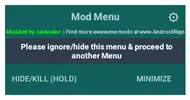
When I open the app this little menu flashes for just a split second, and that's the only modification I see at any point, and I can't find any way to bring up a mod menu
Post automatically merged:
When I open the app this little menu flashes for just a split second, and that's the only modification I see at any point, and I can't find any way to bring up a mod menu
Attachments
Last edited:
OP
OP
ENABLE PERMISSION NEEDEDWhen I open the app this little menu flashes for just a split second, and that's the only modification I see at any point, and I can't find any way to bring up a mod menu
Storage
Overlay
elumiknotty
New User
I have all permissions enabled, including "Display over other apps" and it still won't bring up the mod menu. I guess maybe it just won't work through Windows?ENABLE PERMISSION NEEDED
Storage
Overlay
Post automatically merged:
I was able to get it to work using Bluestacks instead of the Windows Subsystem for Android. Awesome mod--thanks for the making it!
Last edited:
OP
OP
Oh i forgot u use window, yes window playstore not compatible yet with modding world due to overlay permsWindows Subsystem

Akira4869
New User
[Attachment removed from Quotes]
Name: Pirate Booty
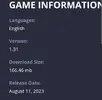
Version: 1.31
Root: No
Mod features:
1. Unlimited currency/mats
2. Instant build
Install Steps:
1. Download & Install mod
2. Enable storage permission
3. Enjoy!
HOW TO ENABLE PERMISSION ON ANDROID
WHY BLACK/WHITE SCREEN/CRASHED?
- Open Settings -> Apps -> Game Name
- Under "Permissions" enable what you have been asked for
GAME STILL CRASHED, HOW TO SEND LOGS?
- Enable STORAGE permission
- Remove gameguardian or any similar memory tool
- Some device has battery optimization, disable it
- Go to folder /Android/data/game package name/files/mod_menu_crash_logs.txt
- Copy & paste or take a screenshot inside the logs, send it here
- Some device may have different dir (document files)
- Alternative way: Install matlogs app (required root device), open matlogs & click start record. Open the game wait for game crashed or few minutes and stop record.
Credits: Jacknator
Telegram: Update news
Playstore Link: Nutaku.net | Online games
[Hidden content]

Akira4869
New User
Kiki201t
Member
g12598
New User
jimjones01
New User
Kiki201t
Member
Kiki201t
Member
Share: