Credit : goddixa
Hi guys with this Guide i will show you in Pictures how to learn Basic Modding, hopefully you will understand this better than the other Guides which are hard to Understand.
We start with the needed Tools:
APK-Manager http://www48.zippyshare.com/v/85PmgYRH/file.html
HxD ( google it ) this is a Hex Editor (Freeware)
IDA or IDA PRO modded
https://userscloud.com/4psjh6ocs5uf
install pass: itJpyHidszaR
Winrar/7zip :: most have this but for those who dont, just google it
Now we can start...
First you need an APK to Mod, in this Guide we take Baymax Bot Fight
_____________________________________________________
- Download the APK http://www66.zippyshare.com/v/tdktNIxq/file.html
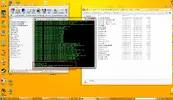
- Move it to this Folder

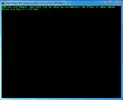
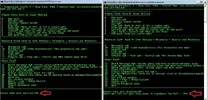
- Now Open the Command-Console

- Now we enter " 22 " to pick the Project we want to work on and then enter " 1 "

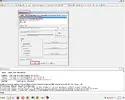
- Now we Configure the Heap-Size to 1024 ( this is needed to Sign correctly later on )
Enter " 20 " and then " 1024 " and press Enter to Configure it.

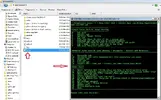
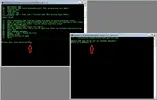
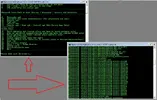
- Now we Extract the APK to the Projectfolder while we Enter " 1 "

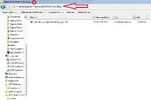
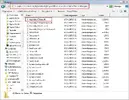
- Now goto Project Folder and Find the Assembly.CSharp.dll

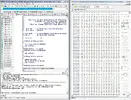
- Now Open the Assembly File with HxD Editor and with IDA

Wait till IDA loaded the Assembly Completely

- Now we look for Codes that could increase our Damage in IDA, in this Game we got Combo Bonus which increases the Damage, lets look for "Combo" or "Multiplier"
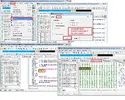
- We Found GetComboMultiplier Function, thats the one we will Mod now, in the following Picture you will see which Adress/Value is for Combo Bonus ( it is the ldc.r41.0) ( in hex it is 22 00 00 80 3F )

- Now we will change this 1.0 to a higher Value, in this case we need a Hex Value which is higher than 1.0, lets look for a higher Value in the IDA, Search for the Value 1000.0 and check its Hex Value ( it should be 22 00 00 7A 44 )

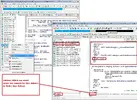
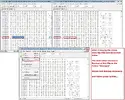
- Goto Hex Editor and Search for the Adress of the 1.0 Value with the Help of IDA where we could see the Adress of this Value and once you find it, change it from 22 00 00 80 3F to22 00 00 7A 44
If you did everything correct till now, you changed the 1.0 to 1000.0 and now the Damage we do is 999 times Higher than before.

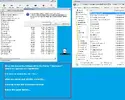
- We are done Modding, now we need to move the Edited Assembly File to the APK Folder and Save it.
Make a Copy of the Assembly-CSharp.dll which you edited onto your Desktop and move it to the APK
Folder by Opening it via Winrar/7zip

- Almost done....now open the Command-Console ( hopefully you didnt close it right from the start )
(If you had Closed the Console by mistake than just open it and Enter 22 and than 1 to select Project
Enter 20 to set Heap-Size again to 1024 and follow now the guide further...)
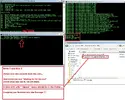
Enter 7 and then 2 and press Enter, the Console will now re-sign and repack the APK together.
If done correctly, a new APK file be in the Folder " place-apk-here-for-modding " just ranamed with " signed "

We are done Modding, i hope this will help some people to learn Modding.
You can use this Method to find Values and Change them.
Functions you can search are example: Damage, Stats, Hero , HP, ATK, Health, Drop, Critical, _get or get_
If you have problems with APK-Manager not working proper check this Video out on Youtube.
NOTE: Keep in Mind, not every Game has Assembly-CSharp.dll
Also some Games have Assembly-CSharp.dll but they Contain only Serverbased Functions, which means you cant Mod every Game.
Credit : goddixa
Hi guys with this Guide i will show you in Pictures how to learn Basic Modding, hopefully you will understand this better than the other Guides which are hard to Understand.
We start with the needed Tools:
APK-Manager http://www48.zippyshare.com/v/85PmgYRH/file.html
HxD ( google it ) this is a Hex Editor (Freeware)
IDA or IDA PRO modded
https://userscloud.com/4psjh6ocs5uf
install pass: itJpyHidszaR
Winrar/7zip :: most have this but for those who dont, just google it
Now we can start...
First you need an APK to Mod, in this Guide we take Baymax Bot Fight
_____________________________________________________
- Download the APK http://www66.zippyshare.com/v/tdktNIxq/file.html
- Move it to this Folder
- Now Open the Command-Console
- Now we enter " 22 " to pick the Project we want to work on and then enter " 1 "
- Now we Configure the Heap-Size to 1024 ( this is needed to Sign correctly later on )
Enter " 20 " and then " 1024 " and press Enter to Configure it.
- Now we Extract the APK to the Projectfolder while we Enter " 1 "
- Now goto Project Folder and Find the Assembly.CSharp.dll
- Now Open the Assembly File with HxD Editor and with IDA
Wait till IDA loaded the Assembly Completely
- Now we look for Codes that could increase our Damage in IDA, in this Game we got Combo Bonus which increases the Damage, lets look for "Combo" or "Multiplier"
- We Found GetComboMultiplier Function, thats the one we will Mod now, in the following Picture you will see which Adress/Value is for Combo Bonus ( it is the ldc.r41.0) ( in hex it is 22 00 00 80 3F )
- Now we will change this 1.0 to a higher Value, in this case we need a Hex Value which is higher than 1.0, lets look for a higher Value in the IDA, Search for the Value 1000.0 and check its Hex Value ( it should be 22 00 00 7A 44 )
- Goto Hex Editor and Search for the Adress of the 1.0 Value with the Help of IDA where we could see the Adress of this Value and once you find it, change it from 22 00 00 80 3F to22 00 00 7A 44
If you did everything correct till now, you changed the 1.0 to 1000.0 and now the Damage we do is 999 times Higher than before.
- We are done Modding, now we need to move the Edited Assembly File to the APK Folder and Save it.
Make a Copy of the Assembly-CSharp.dll which you edited onto your Desktop and move it to the APK
Folder by Opening it via Winrar/7zip
- Almost done....now open the Command-Console ( hopefully you didnt close it right from the start )
(If you had Closed the Console by mistake than just open it and Enter 22 and than 1 to select Project
Enter 20 to set Heap-Size again to 1024 and follow now the guide further...)
Enter 7 and then 2 and press Enter, the Console will now re-sign and repack the APK together.
If done correctly, a new APK file be in the Folder " place-apk-here-for-modding " just ranamed with " signed "
We are done Modding, i hope this will help some people to learn Modding.
You can use this Method to find Values and Change them.
Functions you can search are example: Damage, Stats, Hero , HP, ATK, Health, Drop, Critical, _get or get_
If you have problems with APK-Manager not working proper check this Video out on Youtube.
NOTE: Keep in Mind, not every Game has Assembly-CSharp.dll
Also some Games have Assembly-CSharp.dll but they Contain only Serverbased Functions, which means you cant Mod every Game.
Credit : goddixa
Attachments
-
 37963cff98a35ac301485f3b8691d17ff1fd7f83.webp29.6 KB · Views: 84
 -
 f59e91a4eff57107a4c4c3d651ac2e6ec27369ea.webp109.4 KB · Views: 69
 -
 41cc06d6c9e251f8e2aa8e39da2ed9569044d28f.webp130.4 KB · Views: 64
 -
 c196e7533f1a5bd2706b53f856178568f76c8e69.webp48.6 KB · Views: 78
 -
 99ea945885e2120b13daf8df3262f1eae34a8d58.webp134.4 KB · Views: 85
 -
 38c3d8b3c4c965f4bc204aa073df8bf5a5285c67.webp81.6 KB · Views: 68
 -
 48e83c702c3d93879ec7a95f13dddd2de1d4081c.webp235.6 KB · Views: 118
 -
 312b959c9beb23ce78e2e08075bb3158e05a175e.webp85.7 KB · Views: 108
 -
 7ed8b518c2934b9d2932844dbe36141b36d7d050.webp237.2 KB · Views: 57
 -
 ce5f7989ae66dc7f16cb0fcacc060076cc7e7473.webp164.2 KB · Views: 53
 -
 153c992c2da66c9ead993fc52e1e51703ad8d3d5.webp225.2 KB · Views: 71
 -
 9083b2b3d8a41aa70d64742e7fe0d03c19ab6e28.webp140.5 KB · Views: 90
 -
 a1dfd683107b1d9925ca601704aa9939bf57ec35.webp161.1 KB · Views: 58
Last edited: