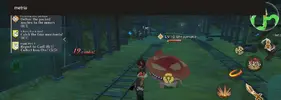
Exclusive RPG METRIA the Starlight v5.8.0 [DMG/DEF]

Jacknator

Do not PM me abt game update, ill ignore.
Exclusive Modding Team
17,010
10/05/15
378,193
Thread Author
Malaysia
5d637e462d8aa93a10cfcea648e871e0.png

Name: metria
Version: 5.8.0
Root: No

Mod features:
1. Unlimited damage
2. Unlimited defense

Install Steps:
1. Download & Install mod
2. Enjoy!

WHY BLACK/WHITE SCREEN/CRASHED?
  • Remove gameguardian or any similar memory tool
  • Some device has battery optimization, disable it
GAME STILL CRASHED, HOW TO SEND LOGS?
  • Go to folder /Android/data/game package name/files/mod_menu_crash_logs.txt
  • Copy & paste or take a screenshot inside the logs, send it here
  • Some device may have different dir (document files)
  • Alternative way: Install matlogs app (required root device), open matlogs & click start record. Open the game wait for game crashed or few minutes and stop record.
The starlight is our hope.
An RPG where hope and sin collide.

- Story -

――You woke up to find yourself standing on an unknown land.
Through various meetings and farewells,
you will find the hidden truth of this world.

- Exciting Battle System -
Choose 3 characters and form a party to slay enemies with their breathtaking skills!
The timing of switching characters is the key to win!
Wipe out enemies with Super Special Moves!

Androidrepublic
Androidrepublic.org
Android republic
Android republic org
TeamAR
Team AR
ARTeam
AR Team
Notes & troubleshoot :
1. You need to disable adblocker to make sure the task is work properly!
2. Switching your connection WiFi/Data or with & without VPN
3. If task asking to download random app,
DO NOT download!
4. You dont need to download any random app/software to get APK, you dont need to leak any personal info or pay to get APK
5. If you had issue with Adblocker detected

Open with private tab (firefox etc)
Open link in the emulators (PC users)
6. If you like my mods consider support by doing the small steps here, not asking for money. Ty!

⬇️ VIDEO TUTORIAL ⬇️

Credits: Jacknator
Telegram: Update news
Playstore Link: RPG METRIA the Starlight - Apps on Google Play
To see this hidden content, you must reply or react with one of the following reactions : Like Like, Love Love, Haha Haha, Wow Wow
 
Last edited:
Same broblem after trying to open the game.
Screenshot_20231108_031854_Metria.jpg


Screenshot_20231108_034759_Metria.jpg


I finished the tutorial with the original apk.
but the problem is that there is an important interface at the top, so when i play a game with mod, covering the top is a big problem lol

i can't even proceed with quests with mod. lol
just throw away your lingering feelings about mods.
 
Last edited:
Just wait for fixing. I cant see login method so if you play org apk, maybe you have to play a new character with modded apk
 
Just wait for fixing. I cant see login method so if you play org apk, maybe you have to play a new character with modded apk
when i inquired about the same phenomenon in other mods before, he said it was a problem he didn't even know.
it wasn't like that before, but at some point in modder's mod, there's a black cover like that.
 
[Attachment removed from Quotes]
Name: metria
Version: 1.0.1
Root: No
Architecture: ARM64

Mod features:
1. Damage x1-100
2. Defense x1-100

Install Steps:
1. Download & Install mod
2. Enable "DRAW OVER" or "DISPLAY POP-UP WINDOW" permission (if Android 6+)
3. Enable storage permission
4. Enjoy!

HOW TO ENABLE PERMISSION ON ANDROID
  • Open device "Settings"
  • Go to APPS
  • Scroll down to desired APP and TAP IT
  • Go to "OTHER PERMISSIONS" or "ADVANCED PERMS" and tick "DRAW OVER" or "DISPLAY POP-UP WINDOW"
WHY BLACK/WHITE SCREEN/CRASHED?
  • Enable STORAGE permission
  • Remove gameguardian or any similar memory tool
  • Some device has battery optimization, disable it
GAME STILL CRASHED, HOW TO SEND LOGS?
  • Go to folder /Android/data/game package name/files/mod_menu_crash_logs.txt
  • Copy & paste or take a screenshot inside the logs, send it here
  • Some device may have different dir (document files)
  • Alternative way: Install matlogs app (required root device), open matlogs & click start record. Open the game wait for game crashed or few minutes and stop record.
The starlight is our hope.
An RPG where hope and sin collide.

- Story -

――You woke up to find yourself standing on an unknown land.
Through various meetings and farewells,
you will find the hidden truth of this world.

- Exciting Battle System -
Choose 3 characters and form a party to slay enemies with their breathtaking skills!
The timing of switching characters is the key to win!
Wipe out enemies with Super Special Moves!

Androidrepublic
Androidrepublic.org
Android republic
Android republic org
TeamAR
Team AR
ARTeam
AR Team
Credits: Jacknator
Telegram: Update news
Playstore Link: METRIA - Apps on Google Play
[Hidden content]
 
Works perfectly fine for me sir @Jacknator i also done linking acc my gmail. Thank you

Only issue i saw was there's no log in option. Automatically logs u in guest acc i think. But u can still link acc after gacha tutorial part
 
Last edited:
Works perfectly fine for me sir @Jacknator i also done linking acc my gmail. Thank you

Only issue i saw was there's no log in option. Automatically logs u in guest acc i think. But u can still link acc after gacha tutorial part
How'd u get rid of the black panel at the top
 
[Attachment removed from Quotes]
Name: metria
Version: 1.0.1
Root: No
Architecture: ARM64

Mod features:
1. Damage x1-100
2. Defense x1-100

Install Steps:
1. Download & Install mod
2. Enable "DRAW OVER" or "DISPLAY POP-UP WINDOW" permission (if Android 6+)
3. Enable storage permission
4. Enjoy!

HOW TO ENABLE PERMISSION ON ANDROID
  • Open device "Settings"
  • Go to APPS
  • Scroll down to desired APP and TAP IT
  • Go to "OTHER PERMISSIONS" or "ADVANCED PERMS" and tick "DRAW OVER" or "DISPLAY POP-UP WINDOW"
WHY BLACK/WHITE SCREEN/CRASHED?
  • Enable STORAGE permission
  • Remove gameguardian or any similar memory tool
  • Some device has battery optimization, disable it
GAME STILL CRASHED, HOW TO SEND LOGS?
  • Go to folder /Android/data/game package name/files/mod_menu_crash_logs.txt
  • Copy & paste or take a screenshot inside the logs, send it here
  • Some device may have different dir (document files)
  • Alternative way: Install matlogs app (required root device), open matlogs & click start record. Open the game wait for game crashed or few minutes and stop record.
The starlight is our hope.
An RPG where hope and sin collide.

- Story -

――You woke up to find yourself standing on an unknown land.
Through various meetings and farewells,
you will find the hidden truth of this world.

- Exciting Battle System -
Choose 3 characters and form a party to slay enemies with their breathtaking skills!
The timing of switching characters is the key to win!
Wipe out enemies with Super Special Moves!

Androidrepublic
Androidrepublic.org
Android republic
Android republic org
TeamAR
Team AR
ARTeam
AR Team
Credits: Jacknator
Telegram: Update news
Playstore Link: METRIA - Apps on Google Play
[Hidden content]

Cute
 
good mod
ty bro


[Attachment removed from Quotes]

I can't proceed with the game because of the black cover at the top 😞
why is that happening?
Just wait for fixing. I cant see login method so if you play org apk, maybe you have to play a new character with modded apk
The black cover at the top is blocking important settings[Attachment removed from Quotes]
How'd u get rid of the black panel at the top
The notch at the top of the screen cant be removed as its linked to the mod menu itself. It should be removed once team AR done migrating to new mod menu.
If you want to play without that notch, try playing on emulator.
 
The notch at the top of the screen cant be removed as its linked to the mod menu itself. It should be removed once team AR done migrating to new mod menu.
If you want to play without that notch, try playing on emulator.
Thanks for taking the time to explain. The mod does say it doesn't support emulators but no reason not to wait till migration is done
 
Surprising, somehow this game can be run on emus. Tested on BS pie, nvm got stuck on loading shop. Anyway, enjoy while it free
 
The notch at the top of the screen cant be removed as its linked to the mod menu itself. It should be removed once team AR done migrating to new mod menu.
If you want to play without that notch, try playing on emulator.
Cant play on vmos or vphone bro
 
This UI at top Blocks everything important to play, also the mod doesnt work for me even if i change the values.
 

Attachments

  • Screenshot_20231108_034210_Metria.webp
    Screenshot_20231108_034210_Metria.webp
    84.7 KB · Views: 59
Floating screen to access memu hehehehe
 

Attachments

  • Screenshot_2023-11-08-00-19-28-740_com.gbwhatsapp.webp
    Screenshot_2023-11-08-00-19-28-740_com.gbwhatsapp.webp
    79 KB · Views: 119
Back
Top Bottom