1.0.15 update.
Please update it if it possible.
Post automatically merged:

Thank you for the quick updates every time.
 
Last edited:
Updated to latest version!
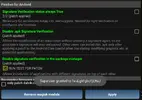
pls help me i cant install this unsign apk ,i download form other website unsign can install
i am using nox player alrdy patch
 

Attachments

  • patch .webp
    patch .webp
    63 KB · Views: 20
pls help me i cant install this unsign apk ,i download form other website unsign can install
i am using nox player alrdy patch
LDplayer Android 7 32bit better with LPatcher , if u still stubborn want use that nox.. just uninstall my mod
 
LDplayer Android 7 32bit better with LPatcher , if u still stubborn want use that nox.. just uninstall my mod
tq you bro , i using LP can install alrdy , i love you bro
Post automatically merged:

1697560951924.png

Post automatically merged:

pls help me google login failed
Post automatically merged:

i need to install original 1st to login google id ?
Post automatically merged:

tq you bro , i using LP can install alrdy , i love you bro
Post automatically merged:

[Attachment removed from Quotes]
Post automatically merged:

pls help me google login failed
Post automatically merged:

i need to install original 1st to login google id ?
i alrdy fix done tq you bro
 
Last edited:
Noticed something really cool with your mod.

Im not sure "what" enables it, maybe loot x100?
But when you click to receive anything that says "watch ad" it will collect it without any Ads playing.

And also, when you go to the shop and navigate to the "ad" section and you click to receive any of the items in that tab, it will not play any Ads, but also, it will not consume any of the 3 times youre allowed to collect those ad rewards.

Meaning you can infinitely collect any of the ad shop items without watching ads and if loot x100 is on, you get x100 of the shops rewards.. an infinite number of times.

Sorry, dont know if this was mentioned already but i wanted to share incase it wasnt.

Thanks for your hard work & dedication. 💪 💯
 
Good game
Post automatically merged:

[Attachment removed from Quotes]
Name: 이세계 성녀 키우기
Version: 1.0.16
Root: Yes (LuckyPatcher Android 7 below / CorePatch Android 8+)

Mod features:
1. Damage x1-150
2. Defense x1-150
3. Freezed currency
4. Fast agros
5. Instant kill
6. Loot x1-100

Install Steps:
1. Download & Install mod
2. Enable "DRAW OVER" or "DISPLAY POP-UP WINDOW" permission (if Android 6+)
3. Enable storage permission
4. Enjoy!

HOW TO ENABLE PERMISSION ON ANDROID
  • Open device "Settings"
  • Go to APPS
  • Scroll down to desired APP and TAP IT
  • Go to "OTHER PERMISSIONS" or "ADVANCED PERMS" and tick "DRAW OVER" or "DISPLAY POP-UP WINDOW"
WHY BLACK/WHITE SCREEN/CRASHED?
  • Enable STORAGE permission
  • Remove gameguardian or any similar memory tool
  • Some device has battery optimization, disable it
GAME STILL CRASHED, HOW TO SEND LOGS?
  • Go to folder /Android/data/game package name/files/mod_menu_crash_logs.txt
  • Copy & paste or take a screenshot inside the logs, send it here
  • Some device may have different dir (document files)
  • Alternative way: Install matlogs app (required root device), open matlogs & click start record. Open the game wait for game crashed or few minutes and stop record.

Credits: Jacknator
Telegram: Update news
Playstore Link: SAINT IDLE - Apps on Google Play
[Hidden content]

Good
 
Last edited:
1.0.17 update.
Please update when you have time.
Have a nice lunch time. Thank you.
 
[Attachment removed from Quotes]
Name: 이세계 성녀 키우기
Version: 1.0.17
Root: Yes (LuckyPatcher Android 7 below / CorePatch Android 8+)

Mod features:
1. Damage x1-150
2. Defense x1-150
3. Freezed currency
4. Fast agros
5. Instant kill
6. Loot x1-100

Install Steps:
1. Download & Install mod
2. Enable "DRAW OVER" or "DISPLAY POP-UP WINDOW" permission (if Android 6+)
3. Enable storage permission
4. Enjoy!

HOW TO ENABLE PERMISSION ON ANDROID
  • Open device "Settings"
  • Go to APPS
  • Scroll down to desired APP and TAP IT
  • Go to "OTHER PERMISSIONS" or "ADVANCED PERMS" and tick "DRAW OVER" or "DISPLAY POP-UP WINDOW"
WHY BLACK/WHITE SCREEN/CRASHED?
  • Enable STORAGE permission
  • Remove gameguardian or any similar memory tool
  • Some device has battery optimization, disable it
GAME STILL CRASHED, HOW TO SEND LOGS?
  • Go to folder /Android/data/game package name/files/mod_menu_crash_logs.txt
  • Copy & paste or take a screenshot inside the logs, send it here
  • Some device may have different dir (document files)
  • Alternative way: Install matlogs app (required root device), open matlogs & click start record. Open the game wait for game crashed or few minutes and stop record.

Credits: Jacknator
Telegram: Update news
Playstore Link: SAINT IDLE - Apps on Google Play
[Hidden content]

Good
 
Back
Top Bottom