

Exclusive TSM v45.1.0.156162 [Currency]
You are using an out of date browser. It may not display this or other websites correctly.
You should upgrade or use an alternative browser.
You should upgrade or use an alternative browser.

Veshara
New User
Step by Step Tutorial for sims with snail learner trait:
1. Download mod apk from the link provided.
2. If you already have the original unmodded game installed in your device follow from step 2, if not skip to step 4:
If you do not want to restart your game from the beginning, go inside your original unmoddedgame and log into facebook to link your account before the next step.
3. Uninstall the original unmodded sims mobile.
4. Install your newly downloaded modded version of the game by going to your mobile's file manager called my files, choose apk installation files, click on the file named The Sims Mobile ver xxx (the version differs according to updates, thus explains the x. Always download the latest modded version available to get your game to run.)
5. If your device does not allow you to install the modded apk, go to settings > security > turn on unknown sources to allow installation of apps from sources other than the appstore. (Note that the unknown sources on/off button may be found in different section in your settings depending on your device. But it is there in settings, you just need to find it.) For security purpose, click allow installation from an unknown source this time only. Repeat the process everytime you want to install an app from other sources than the appstore/ galaxy store.
6. Run the game. If you want to load your game just create whatever character. If you want to play from the beginning, create your character.
7. Follow the tutorial.
8. As soon as it is available on the right hand mid corner of the screen, tap the arrow button and connect to your FB to get your saved game or restart from beginning.
9. If you restart from the beginning, follow tutorial until level 4 and you are asked to create a 2nd sim.
10. Open the buy furniture button on the right of your screen while you are at your sim's home.
11. Choose the home items collection> sanctuary of slumber> and buy the sanctuary of slumber wall mirror for 45 cash.
Now you can see you have millions of coins but little cash. Don't panic just yet.
12. Click the shop button on top left of the screen, you will see you have both millions of cash and coins in the shop but still little cash in the game. It's ok, breathe.
Choose the first tab that looks like a vertical banner and buy yourself a nice set of spawesome furniture. Heck, buy also the sanctuary of slumber set, just for the heck of it. Even if it seems impossible since your in game cash shows less than you can afford, click it and believe in the magic of team AR.
13. Taa taa daa BOOM. You just purchased yourself two nice sets of furniture and your cash millions itself by magic.
14. Say thank you to team AR.
15. Upvote this post for other sims with the "snail learner" trait to learn the "play it rich" trait too.
For updates:
1. Uninstall modded version ONCE YOU GOT MILLIONS OF COINS AND CASH but make sure you have synced the game with FB
2. Install playstore version
3. You got your game back.
Hello.. I'd that method, like tutorial on video, almost 5x re install and re play the game, and read all comments still didnt work for me, my device is Nokia 6 Android 8.1. Can anyone help me?
Last edited:

Djnh
New User

docjo
New User

Pharmacy
New User
Innath
New User
TheGhosTz
New User
It doesn't work for me, tried to clear cache, follow the video, buy all sort of things with both type of currency, nothing works...
Edit: it works after I tried to clear the game data and start new save, you just have to reach the part where you can buy the black fridge, then if the currency change after you bought it then it works, if it didn't change then it didn't work.
Edit: it works after I tried to clear the game data and start new save, you just have to reach the part where you can buy the black fridge, then if the currency change after you bought it then it works, if it didn't change then it didn't work.
Last edited:

Gynocyde
New User
When i try to buy its saying this version doesn't allow... did i do something wrong?
Edit. I had to buy the rise and shine fridge. Then go to sim$$ and i got the cash
Edit. I had to buy the rise and shine fridge. Then go to sim$$ and i got the cash

Kweni
New User
My sims mobile got all of the 4 traits and i have two of them already retired. After completing all the 4 traits just let them work or complete their hobbies first, if they are ready to retire you will be notified not by an email or a message.

Djinn
New User

Mandy
New User
First and foremost, thank you so much for this mod and the work you have put into it @icry4u.
I just had some questions:
I know if you follow the steps in the video; in the tutorial the mod works successfully and you can start a new account with nigh unlimited simoleans/simcash.
Initially I thought I would do this on my already saved file, and despite it not working several times, eventually it worked on my previous accounts.
I tried it on another account, and I'm unable to replicate it on an existing save file. I've tried clearing cache, uninstalling/reinstalling/etc. but no luck on the second account.
Is the one time I got it to work simply a fluke, or am I missing something?
I just had some questions:
I know if you follow the steps in the video; in the tutorial the mod works successfully and you can start a new account with nigh unlimited simoleans/simcash.
Initially I thought I would do this on my already saved file, and despite it not working several times, eventually it worked on my previous accounts.
I tried it on another account, and I'm unable to replicate it on an existing save file. I've tried clearing cache, uninstalling/reinstalling/etc. but no luck on the second account.
Is the one time I got it to work simply a fluke, or am I missing something?
Deffsoul96
New User

unitedrus66
New User

Karoru
New User
The application works as it should, but I have a small problem reached level 10, my sim has a fiancée, I have already done 10 missions that allowed me to come part of the preparation and I do not know why after some time the game started to get ready, I can find out why this happens? Because it worries me a bit and I do not know what needs to be done so that it does not happen any more?

Puremeth
New User

OG_Thanos
Member
Will test it out again and report back on it. It used to work about a month ago, have not played it since.
ChanReiku
New User
Hello Dude! Hope you always keep updating this apk whdn there's a new version of it, you helped me! thanks to you!
OG_Thanos
Member

Minhui
New User
Have u tried switching between mobile data and home Wi-Fi?Hello.. I'd that method, like tutorial on video, almost 5x re install and re play the game, and read all comments still didnt work for me, my device is Nokia 6 Android 8.1. Can anyone help me?
Minhui
New User
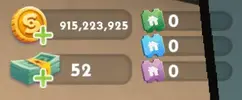
It just worked for me when I switched from mobile data to home wifiJust finished testing. The cash works, but the Simoleons does not. It used to work before but now it does not. See my screenshot please
Share: