Image Link Dead
Hi guys
So today i will teach you how to mod .swf file for CSI Hidden Crimesfor Android. The flash games was build with Adobe flash professional and the programming language is C++. You don't need to learn C++. You don't need any programming experience. you just need some basic knowledge to know on how to return a value to 999,999 or any values you want to input. example
this code means it return green cash to 999,999 and it never change or reduce.
Install SWF decompiler
There are many SWF decompiler softwares on the internet. if you don't know which one, just download and installJPEXS Free Flash Decompiler
You can download other softwares if you want
Link is Broken
Take out the .APK file from your device
Download any back APK apps from Playstore that can backup installed APK file on your device. Just backupCSI Hidden CrimesAPK file on your SDcard and transfer it to your computer
Or you can download the .APK file here:Download APK file
I used X-plore to copy APK file to my computer on Bluestacks

Open .APK file using Winrar and take out the .SWF file
You can download .SWF file and skip this step:Download .SWF file
Right click on the APK file, Click on "Properties"

You will see this window. Click on "Change..."

You will see the window "How do you want to open this type of file (.apk)?". Click on "More options" and click on "Look for another app on this PC"

Go to the path where Winrar is installed and click "Open". Default location isLocal Disk (C ->Program Files->Winrar

After that, click "OK"
Open the .APK file -> Open "assets" folder and copy the "HiddenCrimesANdroidProd.swf"file to your computer

Modding .SWF file
Open the "HiddenCrimesANdroidProd.swf"file and the program will start. Note, i'm usingJPEXS Free Flash Decompilerso i hope this tutorial is also useful for other SWF decompiler softwares. click on "Tools" -> "Text Search"

Search the text "get energyCount", "get coins" or "get greenCash" and click OK.

Let the program decompiling the .SWF file and it should take 15 seconds to finish decompiling (depending on your computer CPU speed). After decompile, you will see this window. Double click on "com.hiddenobject.story.vo.GameProfileVO"

Now you will see the codes. Find the functions named "energyCount", "coins" and "greenCash" and the code should look like this
Click on "Edit" button below.

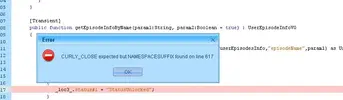
If you don't have PlayerGlobal library installed in your computer, you will see this message.


Click "OK" to download PlayerGlobal library from adobe website or you can download it here:DOWNLOAD PLAYERGLOBAL .swc. After you download it, put the.swcfile into "C:\Users\<your name>\AppData\Roaming\JPEXS\FFDec\flashlib\"

Click on "Edit" button below again, you will see the warning message and click "OK" and now you will be able to edit the code
Change them all to return 999999; like this. DON'T ever forget the ";" at the end of "999999", otherwise the game won't work.

Save the .SWF file
After you modified the code, click on "Save" button below and the code will be saved.

Now click on "File" -> "Save" and it will save modified codes in .SWF file.

Replace the modded .SWF file inside the .APK file
Open the.APKfile with Winrar, open "assets" folder and replace modded.SWFfile inside.

Sign the APK file using any APK tools
Now you have to sign the.APKfile using any APK tools, otherwise the APK won't install on your device.
I'm using APK-Multi-Tool to sign an.APKfile

Result and proof
So here is the result. Energy, coins and cash are 999,999

Download modded APK
You can download the modded APK here
Credits:
iAndroHackerDK
Hi guys
So today i will teach you how to mod .swf file for CSI Hidden Crimesfor Android. The flash games was build with Adobe flash professional and the programming language is C++. You don't need to learn C++. You don't need any programming experience. you just need some basic knowledge to know on how to return a value to 999,999 or any values you want to input. example
Code:
public function getgreenCash() : int
{
return 999999;
}
this code means it return green cash to 999,999 and it never change or reduce.
Install SWF decompiler
There are many SWF decompiler softwares on the internet. if you don't know which one, just download and installJPEXS Free Flash Decompiler
You can download other softwares if you want
Link is Broken
Take out the .APK file from your device
Download any back APK apps from Playstore that can backup installed APK file on your device. Just backupCSI Hidden CrimesAPK file on your SDcard and transfer it to your computer
Or you can download the .APK file here:Download APK file
I used X-plore to copy APK file to my computer on Bluestacks
Open .APK file using Winrar and take out the .SWF file
You can download .SWF file and skip this step:Download .SWF file
Right click on the APK file, Click on "Properties"
You will see this window. Click on "Change..."
You will see the window "How do you want to open this type of file (.apk)?". Click on "More options" and click on "Look for another app on this PC"
Go to the path where Winrar is installed and click "Open". Default location isLocal Disk (C
->Program Files->WinrarAfter that, click "OK"
Open the .APK file -> Open "assets" folder and copy the "HiddenCrimesANdroidProd.swf"file to your computer
Modding .SWF file
Open the "HiddenCrimesANdroidProd.swf"file and the program will start. Note, i'm usingJPEXS Free Flash Decompilerso i hope this tutorial is also useful for other SWF decompiler softwares. click on "Tools" -> "Text Search"
Search the text "get energyCount", "get coins" or "get greenCash" and click OK.
Let the program decompiling the .SWF file and it should take 15 seconds to finish decompiling (depending on your computer CPU speed). After decompile, you will see this window. Double click on "com.hiddenobject.story.vo.GameProfileVO"
Now you will see the codes. Find the functions named "energyCount", "coins" and "greenCash" and the code should look like this
Code:
public function getgreenCash() : int
{
  returngetAllCurrencyType("GreenCash").value;
}

public function getcoins() : Number
{
returnearnedCoins + boughtCoins;
}

public functionget energyCount() : int
{
return_energyCount;
}
Click on "Edit" button below.
If you don't have PlayerGlobal library installed in your computer, you will see this message.
Click "OK" to download PlayerGlobal library from adobe website or you can download it here:DOWNLOAD PLAYERGLOBAL .swc. After you download it, put the.swcfile into "C:\Users\<your name>\AppData\Roaming\JPEXS\FFDec\flashlib\"
Click on "Edit" button below again, you will see the warning message and click "OK" and now you will be able to edit the code
Change them all to return 999999; like this. DON'T ever forget the ";" at the end of "999999", otherwise the game won't work.
Code:
public function getgreenCash() : int
{
return 999999;
}
public function getcoins() : Number
{
return 999999;
}
public function get energyCount() : int
{
return 999999;
}
Save the .SWF file
After you modified the code, click on "Save" button below and the code will be saved.
Now click on "File" -> "Save" and it will save modified codes in .SWF file.
Replace the modded .SWF file inside the .APK file
Open the.APKfile with Winrar, open "assets" folder and replace modded.SWFfile inside.
Sign the APK file using any APK tools
Now you have to sign the.APKfile using any APK tools, otherwise the APK won't install on your device.
I'm using APK-Multi-Tool to sign an.APKfile
Result and proof
So here is the result. Energy, coins and cash are 999,999
Download modded APK
You can download the modded APK here
Credits:
iAndroHackerDK