

Outdated Mobile Legends: Bang Bang || PATCH ATLAS || kuroyama MOD FREE ||UNLOCK SKINS & MORE| v1.4.61.5002 [MOD]
You are using an out of date browser. It may not display this or other websites correctly.
You should upgrade or use an alternative browser.
You should upgrade or use an alternative browser.
- Status
- Not open for further replies.


Srdenz
New User
Srdenz
New User
1. Open the bypass app, 2. Select bypass undetected, 3. MLBB's run, if it is still detected repeat it continuouslyI dont know how you do it but i always get detection

TogeTogean
Unavaiable | Contact @saidenomega on Telegram

fathyakuza
New User

Hazoom
New User
Yep and he didn't answer anywayThis is not version 1.4.61.5002.
Kuroyama VIP.apk This file is outdated. The game is forced to restart due to an unknown error. Have you checked and uploaded the file?
-the game started good but with old version and this cant play wit any update to the moded apk here !?
esshaker
New User
Srdenz
New User
Step 1, download MLBB original from the playstore, download all the data to 100%, step 2, download MLBB kiroyama along with his bypass app,hi could you tell me in detail how you made it work? like step by step. i'm dumb. thanks
step 3, change the name folder com.mobile.Legends to com.mobile.Legend1,
step 4. Remove the installation of the original MLBB, then install MLBB kuroyama along with his bypass application,
step 5. Rename the folder com.mobile.Legends takes shape once,
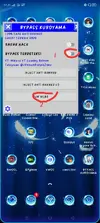
step 6. Open a bypass app and follow the steps on the picture, if it is still detected repeat the existing steps drawn continuously
Attachments
OP
OP

OP
OP
why my download resources not working its keep 0%
You must first copy all data from the original apk before installing the apk mod.
OP
OP
Step 1, download MLBB original from the playstore, download all the data to 100%, step 2, download MLBB kiroyama along with his bypass app,
step 3, change the name folder com.mobile.Legends to com.mobile.Legend1,
step 4. Remove the installation of the original MLBB, then install MLBB kuroyama along with his bypass application,
step 5. Rename the folder com.mobile.Legends takes shape once,
step 6. Open a bypass app and follow the steps on the picture, if it is still detected repeat the existing steps drawn continuously
What has not been said is that you should only check the option "Bypass" only on the loading screen and you will receive the detection message, then you can open it normally by apk mod.
Later the video tutorial will be ready.
Srdenz
New User
Thank youWhat has not been said is that you should only check the option "Bypass" only on the loading screen and you will receive the detection message, then you can open it normally by apk mod.
Later the video tutorial will be ready.
kiedhayl
New User
esshaker
New User
Thanks man, your a life saver, i'll try it laterStep 1, download MLBB original from the playstore, download all the data to 100%, step 2, download MLBB kiroyama along with his bypass app,
step 3, change the name folder com.mobile.Legends to com.mobile.Legend1,
step 4. Remove the installation of the original MLBB, then install MLBB kuroyama along with his bypass application,
step 5. Rename the folder com.mobile.Legends takes shape once,
step 6. Open a bypass app and follow the steps on the picture, if it is still detected repeat the existing steps drawn continuously
esshaker
New User
Hazoom
New User
OP
OP
I added the video tutorial.
If you still have problems with the installation send me your teamviewer id by PM
If you still have problems with the installation send me your teamviewer id by PM
Last edited:
OP
OP
poppyza5441
New User
OP
OP
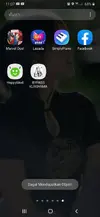
failed to obtain object...
gagal mendapatkan object
Gagal Mendapatkan Object
Is your android 5 ?
- Status
- Not open for further replies.
Share: